
NeMo guardrails use NVIDIA NeMo Guardrails to check agent inputs and outputs. One NeMo guardrail can combine several checks — called rails — such as forbidden patterns, a written company policy, and NVIDIA NemoGuard safety models.
Before You Start
NeMo guardrails are off by default. Your platform administrator must:
- Set
FF_NEMO_GUARDRAILS_ENABLEDandNEXT_PUBLIC_FF_NEMO_GUARDRAILS_ENABLEDtotrueon the Bot Builder service. The NeMo tab then appears on the Guardrails page. - Run guardrails in direct mode (
FF_GUARDRAIL_MODE=direct). NeMo guardrails cannot be created or used in proxy mode. - For the Content Safety and Topic Safety rails, register an NVIDIA NemoGuard model in Control Center → LLMs and enable it for the workspace under Integrations → LLMs. Only enabled models whose provider or identifier contains “nvidia” are offered.
Creating a NeMo Guardrail
On the NeMo tab, click + (Create NeMo Guardrail). Turn on at least one rail. Each rail’s fields appear when you switch it on.
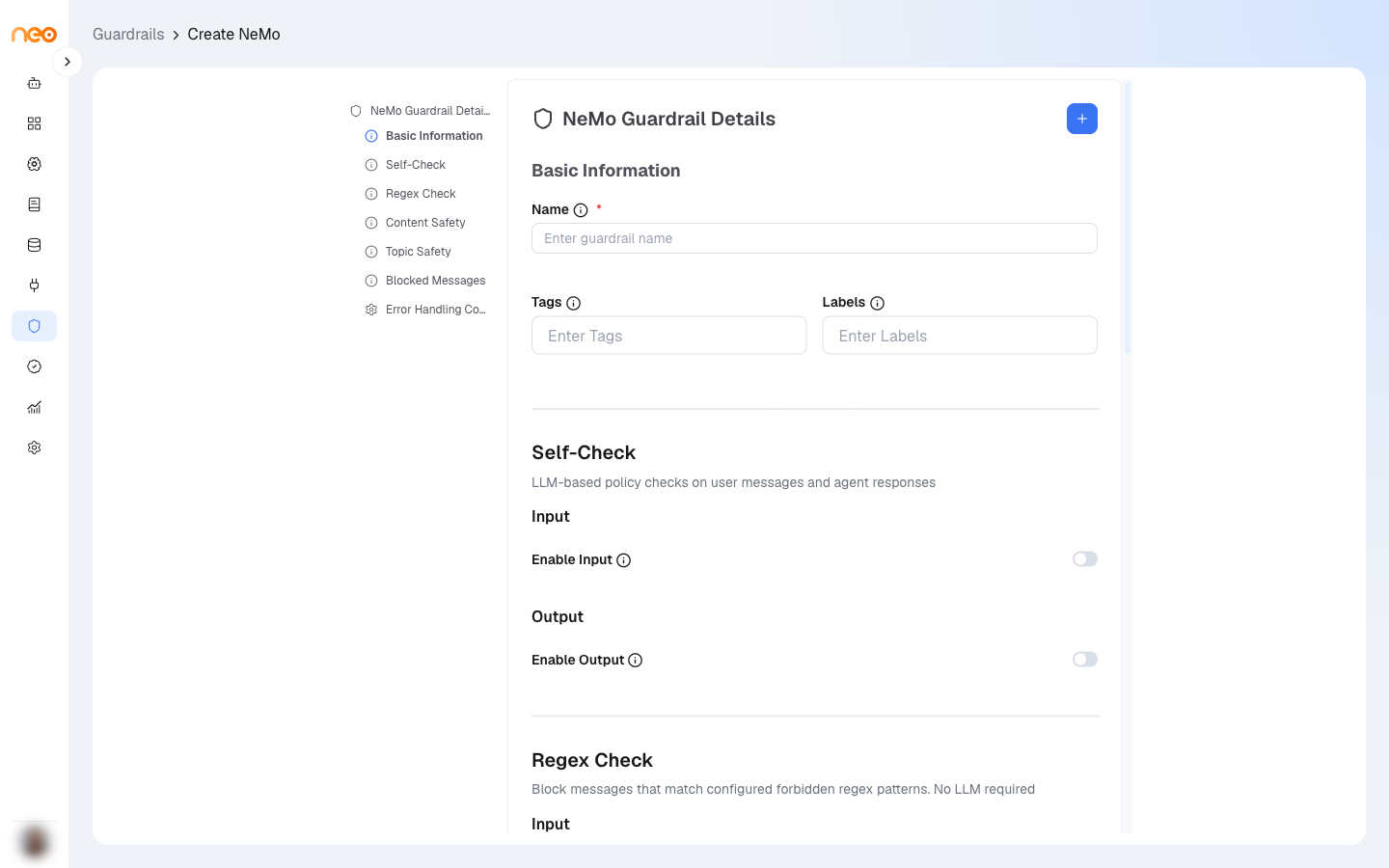
Basic Information
- Name — lowercase letters, numbers, and hyphens, up to 50 characters. Cannot be changed after the guardrail is created. Required.
- Tags and Labels — metadata for organisation and governance. Press Enter after each one.
Self-Check
Checks messages against a written policy, using the model of the agent or Guardrail component the guardrail is attached to.
- Enable Input — checks the user’s message before the agent responds. Self-Check Input Prompt holds your policy for user messages; it starts with a default policy you can edit.
- Enable Output — checks the agent’s response. Self-Check Output Prompt holds your policy for agent messages.
Write the policy as a list of rules. The platform adds the message and a yes/no question to the end of your prompt.
Regex Check
Blocks messages that match any of your patterns. No model is needed.
- Input Patterns — patterns checked against user messages, for example
(?i)ssn|social.?security. - Output Patterns — patterns checked against agent responses, for example
(?i)api[_-]?key.
Press Enter after each pattern. At least one pattern is required for each direction you turn on.
Content Safety
Blocks unsafe content using an NVIDIA NemoGuard content safety model. Turn on Enable Input, Enable Output, or both, and choose the Content Safety Model. The model checks a fixed set of categories, including violence, sexual content, hate, harassment, self-harm, PII and privacy, fraud, malware, and unauthorised advice.
Topic Safety
Keeps users on allowed topics. Applies to user messages only.
- Topic Safety Model — an NVIDIA NemoGuard topic control model. Required.
- Allowed / Blocked Topics — one line per rule describing what is on-topic and off-topic. For example: “Allow questions about our product, pricing, and support.”, “Block politics, medical advice, and legal advice.” Required.
Blocked Messages
- Blocked Input Message — shown to the user when their message is blocked. Up to 500 characters. Required.
- Blocked Output Message — shown when the agent’s response is blocked. Up to 500 characters. Required.
Error Handling Config
- Strategy — Fallback.
- Fallback Response — returned when the guardrail cannot run, for example when a safety model is unavailable. It is not used when a rail blocks a message. Required.
When a NeMo guardrail cannot run, the message is not passed through — the user sees the fallback response.
How the Rails Run
Rails run in this order, and checking stops at the first rail that blocks: Regex, Self-Check, Content Safety, Topic Safety. A blocked user message returns the Blocked Input Message; a blocked response returns the Blocked Output Message.
Using a NeMo Guardrail
Apply a NeMo guardrail the same way as other guardrails:
- Agentic Flow — in the Guardrail component, or in the Input Guardrails and Output Guardrails settings of an Agent component. The Self-Check rails use the model selected on that component.
- AI Coworkers — in the Input guardrail and Output guardrail dropdowns on the Governance tab.
Managing NeMo Guardrails
Each save creates a new version, and agents use the latest version. Click a card to edit it, or use the card menu to Share it. Deleting a NeMo guardrail disables all of its versions. NeMo guardrails can also be exported and imported in bulk with the other guardrail types.