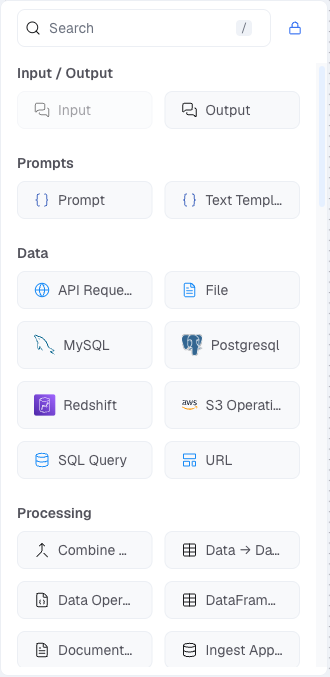
/ Agentic Flow Builder / Component Types Component Types Components are the building blocks of an Agentic Flow. They are organised into categories in the sidebar. Each component exposes input and output handles that determine how data flows between them.
Saved
The Saved category lists components you have previously saved from the canvas for reuse across flows. Right-click any component on the canvas and select Save to add it here.
Component Description Input The entry point for the flow. Receives the user’s message or trigger payload and passes it downstream. Output The exit point of the flow. Returns the final result to the caller or connected channel.
The Playground is only available when the flow contains at least one Input and one Output component.
Prompts
Component Description Prompt Constructs a prompt string from a template. Supports variable interpolation using {variable} syntax. The output is a formatted prompt message passed to an Agent component.
Data
Component Description API Request Makes an HTTP request to an external URL and passes the response downstream. File Loads a file (uploaded or from a URL) and makes its content available to the flow. MySQL Executes a query against a MySQL database and returns the results. PostgreSQL Executes a query against a PostgreSQL database and returns the results. Redshift Executes a query against an Amazon Redshift data warehouse. S3 Operations Reads from or writes to an Amazon S3 bucket. SQL Query Executes a SQL query against a configured database connection. URL Fetches content from a URL and returns the raw response. Webhook Receives an inbound HTTP request and uses the payload as input to the flow.
Processing
Component Description Combine Data Merges outputs from multiple upstream components into a single data object. Data → DataFrame Converts raw data into a tabular DataFrame structure for further processing. Data Operations Applies transformations to structured data (filter, map, merge, rename, remove keys, etc.). DataFrame Operations Applies operations on a DataFrame (sort, filter, sample, select columns). Document Parser Extracts text and structure from documents (PDF, DOCX, etc.) using configurable parsing strategies. Ingest Approved Response Captures the approved response from a Human In The Loop step and injects it back into the flow. Lambda Filter (Beta) Filters a list of items using a custom expression. LLM Router Routes the flow to one of several downstream paths based on the output of an LLM classification. Message to Data (Beta) Converts a conversation message object into a structured data record. Parser Parses structured text (JSON, XML, CSV) into a usable data object. Regex Extractor Extracts values from text using a regular expression pattern. Split Text Splits text or a DataFrame into chunks using configurable size and overlap settings. Streaming Data to Message Converts a streaming data response into a standard message format.
Knowledge Base
Component Description Knowledge Retrieval Retrieves relevant chunks from a knowledge base using semantic search. Connects to knowledge bases configured in the Foundry. OpenSearch Queries an Amazon OpenSearch index directly with configurable search type, scoring threshold, and hybrid search support.
Agents
Component Description Agent A general-purpose autonomous agent that uses an LLM with tools and knowledge bases to reason and act over multiple steps. Intent Classification Agent (Beta) Classifies the user’s intent and returns a structured output with the classified category. Human In The Loop (Beta) Pauses the flow and sends an approval request to configured delivery targets. Resumes once approved or rejected. Channel Agent (Beta) An agent wired to a communication channel. Handles inbound messages and routes outbound replies to configured delivery targets. For new channel integrations, use the Output node with Channel Delivery turned on. See Channels . Skills Attaches workspace skills to an Agent, with a per-skill Allow / Ask approval setting. See Skills . Flow Agent Calls another Agentic Flow as a sub-flow and returns its output into the current flow. Voice Agent Call Triggers a Voice Agent call and returns the call response. Break Agent Immediately terminates the current flow execution with an optional break reason and instruction.
Logic
Component Description If-Else Branches the flow based on a boolean condition evaluated against an input value. Condition (Legacy) Evaluates a conditional expression and routes to one of multiple output paths based on the result. Code Execution Executes a Python snippet and returns the result. Use for custom logic that cannot be expressed with other components. Guardrail Applies a configured guardrail policy to data passing through this point. Blocks or flags content that violates the policy. Loop Iterates over a list of items and executes a downstream path for each item. Run Flow (Beta) Executes another flow by ID and returns its output. Confidence Score Component Evaluates a confidence score and branches on whether it exceeds a configured threshold.
Others
Component Description Notes A non-executable annotation node. Add comments or labels to sections of the canvas. Current Date Outputs the current date and time, which can be injected into prompts or conditions. Message History Retrieves the conversation message history for use in prompts or as context for an agent. Structured Output Parses agent output into a structured schema (JSON object) according to a defined format.
Integrations
The Integrations category combines built-in tools, MCP tool components, and any custom tools configured in the workspace. The category is always visible; the components inside depend on what has been set up by a workspace administrator.
Component Description Calculator Evaluates a mathematical expression and returns the result. MCP Client Connects to an MCP (Model Context Protocol) server configured in the workspace and exposes its tools to an Agent component. Public MCP Client Connects to any publicly accessible MCP server by URL. Custom Tools In-house and custom tools added by a workspace administrator. Each appears as a draggable component once configured.
Bundles
Bundles are grouped sets of components from a specific vendor or framework. They appear as collapsible sections at the bottom of the sidebar.
Agentic Patterns
Advanced multi-agent orchestration components for structured collaboration and task decomposition.
Component Description Agent Capability Defines a capability that can be assigned to an agent within a multi-agent pattern. Collaboration Orchestrator Orchestrates multiple agents working in parallel or sequence to complete a shared goal. Hierarchical Decomposer Decomposes a goal into a hierarchical task tree and assigns sub-tasks to agents. Task Decomposer Breaks down a high-level task into smaller sub-tasks for downstream agents. Task Orchestrator Coordinates execution of a task graph produced by a decomposer. Task Visualization Renders a task graph for inspection and monitoring within the flow.
Memories
Component Description PostgreSQL Chat Memory Stores and retrieves conversation history from a PostgreSQL database for persistent memory across sessions.
Amazon / AWS
LangChain
Component Description CharacterTextSplitter Splits text into chunks using a character-based splitter. CSV Agent A LangChain agent that can read and query CSV files using natural language. SQL Agent A LangChain agent that can query a SQL database using natural language. SQLDatabase Connects to a SQL database and exposes it as a data source for LangChain agents. Tool Calling Agent A LangChain agent that uses tool-calling capable language models to reason and act. XML Agent (Beta) A LangChain agent that processes XML-structured inputs and tool responses.
MCP
Component Description MCP Client Connects to an MCP (Model Context Protocol) server configured in the workspace and exposes its tools to an Agent component. Public MCP Client Connects to any publicly accessible MCP server by URL.
Red Hat
Component Description Red-Hat OpenAI Chat Calls a Red Hat–hosted OpenAI-compatible chat endpoint and returns the response.