Guardrails
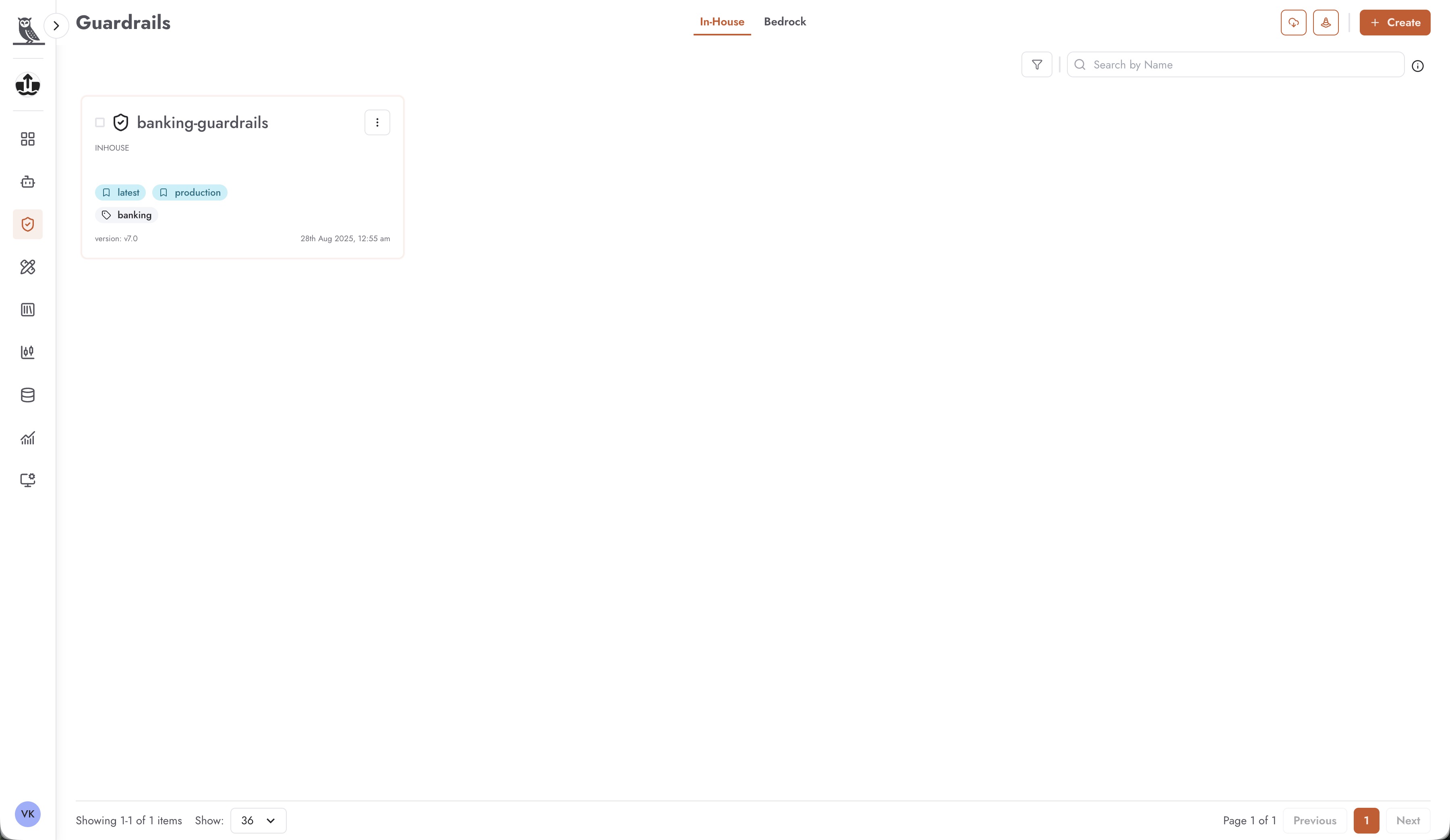
Guardrails are a critical component of the OneByZero Neo Foundry that enable enterprises to establish and enforce safety, compliance, and quality standards across their AI agents. As a Foundry-level feature, guardrails are designed to be created once and reused across multiple agents, providing a centralized approach to AI governance that scales with your organization.
Why Guardrails Matter for Enterprise AI
As organizations deploy AI agents across various business functions, maintaining consistent safety and compliance standards becomes increasingly challenging. Without proper guardrails, each agent might handle sensitive content differently, leading to inconsistent user experiences, potential compliance violations, and governance gaps.
OneByZero Neo addresses this challenge by treating guardrails as reusable, centralized resources within the Foundry. This design philosophy offers several key advantages:
- Centralized Governance
Enterprise compliance teams can create standardized guardrails that embody organizational policies, regulatory requirements, and brand guidelines. These guardrails serve as the single source of truth for how AI agents should handle sensitive topics, ensuring consistent behavior across all deployed agents.
- Reusability Across Agents
Once a guardrail is created and configured, it can be applied to any number of agents across different workspaces. This eliminates the need to recreate the same safety rules for each new agent and ensures that updates to a guardrail automatically propagate to all agents using it.
- Categorized Application
Organizations can create different guardrails for different categories of agents. For example, customer-facing agents might require stricter content filtering than internal productivity agents, while agents handling financial data might need specialized PII protection rules. This categorical approach allows for nuanced governance that balances safety with functionality.
- Audit and Compliance
By centralizing guardrail definitions in the Foundry, organizations gain better visibility into what safety measures are in place across their agent ecosystem. This centralization simplifies compliance audits and makes it easier to demonstrate adherence to regulatory requirements.
- Version Control and Lifecycle Management
Guardrails support versioning and tagging, allowing organizations to manage the lifecycle of their safety policies. You can maintain different versions for development, testing, and production environments, and roll back to previous versions if needed.
Guardrail Types
OneByZero Neo supports two types of guardrails, each offering different capabilities and integration approaches:
In-House Guardrails - Custom guardrails built using Neo’s native guardrail engine, offering flexibility and full control over validation logic
Bedrock Guardrails - Integration with AWS Bedrock Guardrails, leveraging Amazon’s managed guardrail service for enterprise-grade content filtering and PII protection
You can switch between viewing In-House and Bedrock guardrails using the tabs at the top of the Guardrails page. Each type has its own creation workflow and configuration options, but both can be applied to agents in the same way once created.
In-House Guardrails
In-House guardrails are custom guardrails that you build and manage entirely within the OneByZero Neo platform. These guardrails provide maximum flexibility, allowing you to define validation logic that precisely matches your organization’s requirements.
Creating an In-House Guardrail
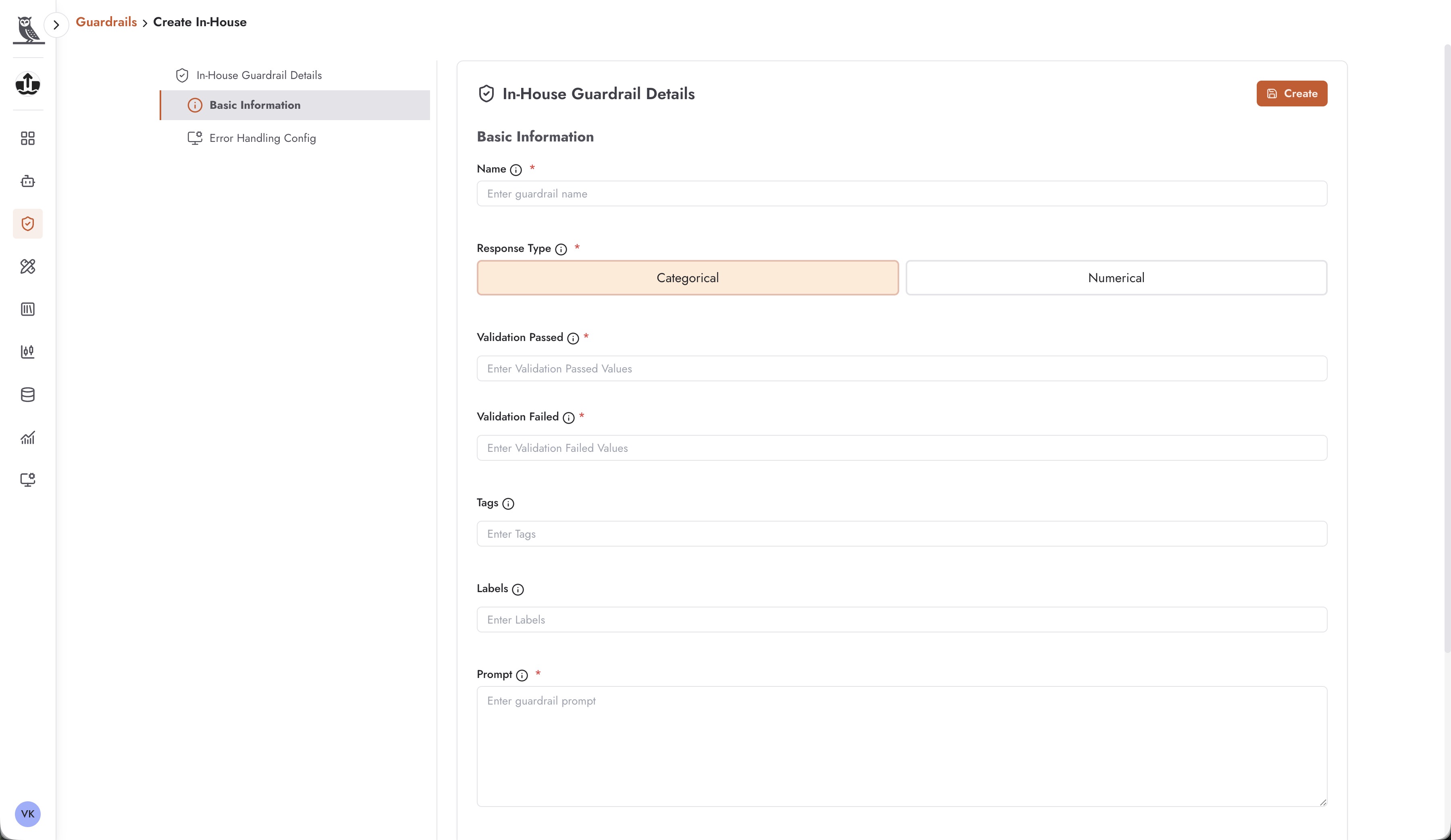
To create a new In-House guardrail, click the + Create button while on the In-House tab. You will be presented with a configuration form that includes the following sections:
Basic Information
The Basic Information section captures the essential details about your guardrail:
Name - A unique, descriptive name for the guardrail that clearly indicates its purpose. Choose names that will be meaningful to other team members who may apply this guardrail to their agents, such as “banking-guardrails” or “healthcare-compliance-filter”.
Response Type - Determines how the guardrail evaluates content:
Categorical - The guardrail returns discrete category labels (e.g., “safe”, “unsafe”, “requires_review”). Use categorical responses when you need to classify content into distinct categories for routing or filtering decisions.
Numerical - The guardrail returns a numeric score (e.g., a confidence value between 0 and 1). Use numerical responses when you need more granular assessment of content or when downstream logic requires threshold-based decisions.
Validation Passed - Define the values or conditions that indicate content has passed the guardrail check. For categorical guardrails, this might be specific labels like “safe” or “approved”. For numerical guardrails, this defines the acceptable score range.
Validation Failed - Define the values or conditions that indicate content has failed the guardrail check. This determines when agent responses should be blocked, modified, or flagged for review.
Tags - Apply tags to organize and categorize your guardrails. Tags make it easier to find and filter guardrails, especially as your library grows. Common tagging strategies include tagging by department, use case, or compliance requirement.
Labels - Additional metadata labels that can be used for filtering, reporting, and governance purposes.
Prompt - The core instruction that defines what the guardrail should evaluate and how. This prompt is sent to the underlying model along with the content being evaluated. Write clear, specific prompts that precisely describe the validation criteria. For example: “Evaluate whether the following text contains any discussion of competitor products or pricing. Respond with ‘contains_competitor_info’ if competitor information is present, or ‘clean’ if no competitor information is found.”
Error Handling Config
The Error Handling Config section allows you to define how the system should behave when the guardrail encounters errors during evaluation:
Configure fallback behaviors for when the guardrail service is unavailable
Define timeout settings and retry policies
Specify default actions when evaluation fails (e.g., block by default for safety-critical guardrails, or allow by default for less critical checks)
Bedrock Guardrails
Bedrock guardrails integrate OneByZero Neo with AWS Bedrock Guardrails, Amazon’s managed service for implementing safeguards in generative AI applications. This integration allows you to leverage Amazon’s sophisticated content filtering, topic blocking, and PII protection capabilities directly within your Neo agents.
Creating a Bedrock Guardrail
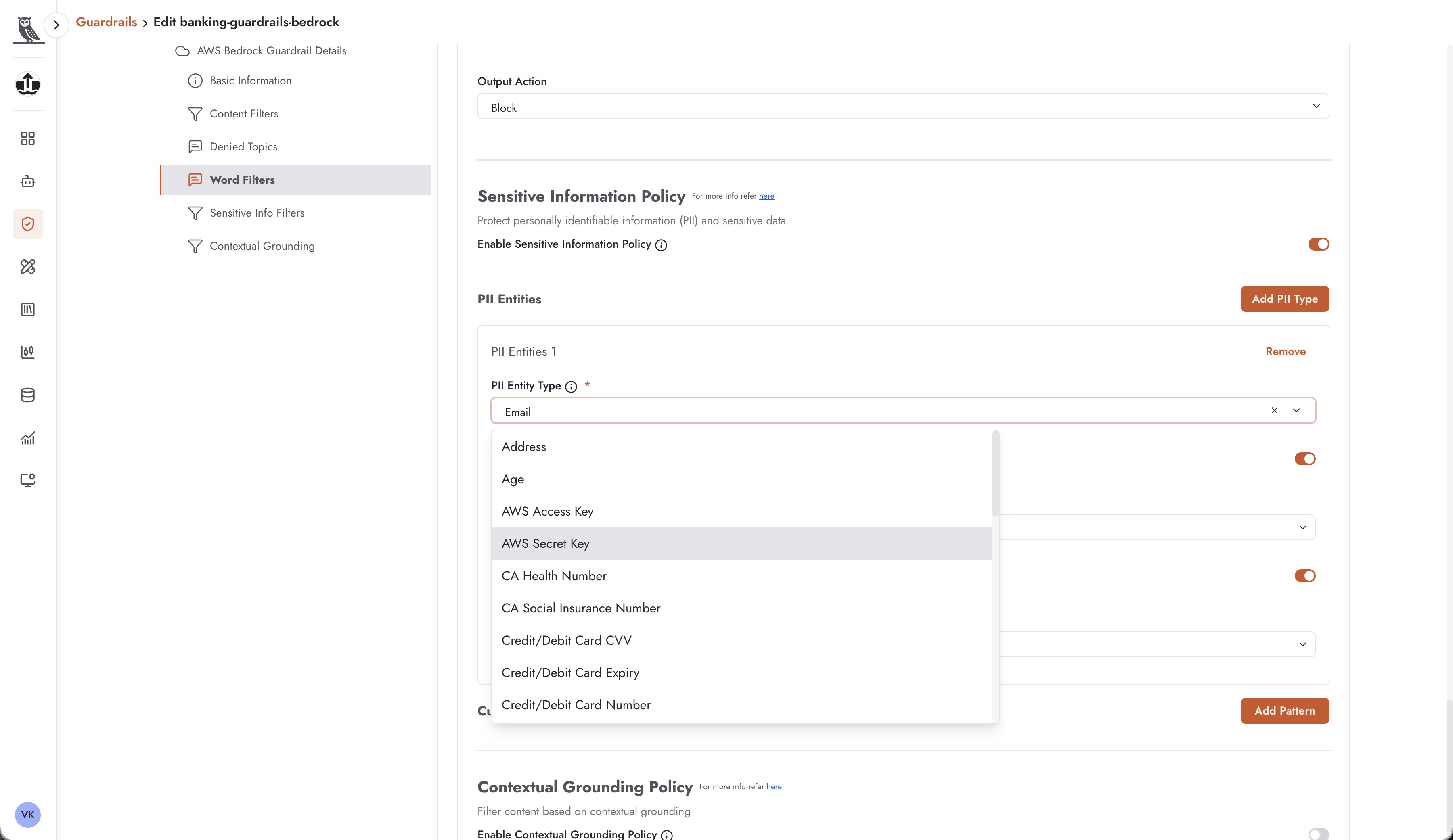
To create a new Bedrock guardrail, switch to the Bedrock tab and click the + Create button. The Bedrock guardrail configuration provides access to AWS Bedrock’s comprehensive filtering capabilities:
Basic Information
Similar to In-House guardrails, you’ll provide a name and basic metadata for the guardrail. This information is used within Neo to identify and manage the guardrail.
Content Filters
Content filters allow you to block or flag content based on harmful categories. AWS Bedrock provides pre-built filters for common content safety concerns including:
Hate speech and discrimination
Violence and threats
Sexual content
Profanity and offensive language
Misconduct and illegal activities
For each category, you can configure the sensitivity level and the action to take (block, warn, or allow with logging).
Denied Topics
Denied topics allow you to specify subjects that the AI should refuse to discuss. This is particularly useful for:
Preventing discussion of competitors
Blocking inappropriate topics for your industry
Enforcing brand and communication guidelines
Restricting conversation to approved subject areas
You can define custom denied topics with descriptions that help the model understand what content should be blocked.
Word Filters
Word filters provide explicit control over specific words and phrases that should be blocked or flagged. This includes:
Profanity and offensive language lists
Competitor names and products
Restricted terminology specific to your industry
Custom blocked phrases
Sensitive Information Filters
The Sensitive Information Policy is one of the most powerful features of Bedrock guardrails, providing comprehensive protection for personally identifiable information (PII) and other sensitive data. You can enable filtering for a wide range of PII entity types including:
Personal Identifiers - Email addresses, phone numbers, names, addresses, age, date of birth
Financial Information - Credit/debit card numbers, CVV codes, card expiry dates, bank account numbers
Government IDs - Social Security numbers, driver’s license numbers, passport numbers
Healthcare Information - Health insurance numbers, medical record numbers (supports various regional formats like CA Health Number)
Cloud Credentials - AWS Access Keys, AWS Secret Keys, API tokens
Regional Identifiers - CA Social Insurance Number, UK National Insurance Number, and other country-specific identifiers
For each PII type, you can configure the action to take:
Block - Completely prevent the content from being processed or returned
Mask - Replace the sensitive information with placeholder text (e.g., [EMAIL_REDACTED])
Allow with Logging - Permit the content but log it for audit purposes
Contextual Grounding
Contextual grounding policies help ensure that AI responses are grounded in factual information and don’t include hallucinated or fabricated content. This is particularly important for:
Customer support agents that must provide accurate information
Agents that reference specific documents or knowledge bases
Any use case where factual accuracy is critical
Applying Guardrails to Agents
Once you have created guardrails in the Foundry, you can apply them to any agent in your workspaces. Guardrails can be configured in the agent’s Settings tab, where you can:
Select one or more guardrails to apply to the agent
Configure the order in which guardrails are evaluated
Set up different guardrails for input (user messages) vs. output (agent responses)
Define behavior when guardrails are triggered (block, modify, or flag for review)
Best Practices for Guardrail Application
Layer your guardrails - Apply multiple guardrails with different focuses (e.g., one for PII, one for brand compliance, one for topic restrictions) rather than trying to handle everything in a single guardrail.
Test thoroughly - Before deploying guardrails to production agents, test them with a variety of inputs to ensure they catch what they should while not being overly restrictive.
Monitor and iterate - Review guardrail triggers in production to identify false positives and refine your configurations over time.
Document your guardrails - Use descriptive names, tags, and labels to make it easy for team members to understand what each guardrail does and when to use it.
Managing Guardrails
The Guardrails page provides several tools for managing your guardrail library:
Search and Filter
Use the search box to find guardrails by name, or use filters to narrow down the list by tags, labels, or other criteria. This becomes essential as your organization builds a comprehensive library of guardrails.
Version Management
Each guardrail displays its version number (e.g., “version: v7.0”) and last modified timestamp. You can create new versions of guardrails while preserving the ability to reference or roll back to previous versions.
Import and Export
Guardrails can be imported and exported, allowing you to share guardrail configurations across Neo instances or environments. This is useful for promoting guardrails from development to production or sharing standardized guardrails across different parts of your organization.
Tagging for Organization
Apply tags like “latest”, “production”, or category-specific tags (e.g., “banking”, “healthcare”) to organize your guardrails. These tags help team members quickly identify which guardrails are appropriate for their use cases and which are approved for production use.