FactoryGPT
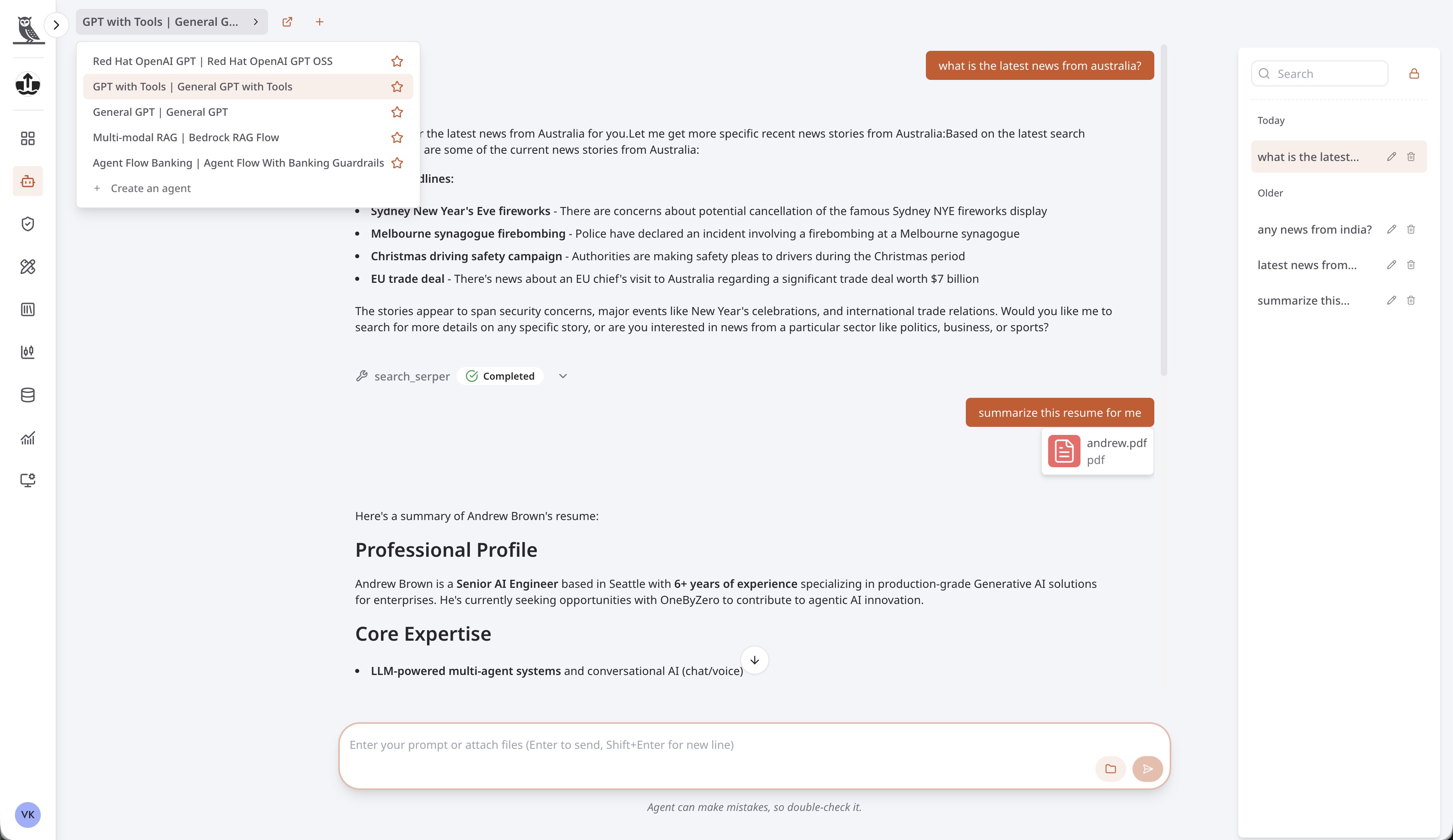
FactoryGPT is an interactive interface that allows users to chat with agents that have the FactoryGPT channel enabled. This provides a convenient way to interact with and test your agents directly within the OneByZero Neo platform.
Overview
FactoryGPT offers a flexible chat environment that can be configured to support a wide range of interaction patterns. Depending on how your agents are set up, you can use FactoryGPT to:
Interact with specific LLMs - Chat directly with a particular Large Language Model to explore its capabilities and responses.
Engage with fully configured agents - Interact with agents that have been configured with multiple LLMs, knowledge bases, and tools, providing a rich conversational experience powered by your organization’s data and integrations.
Test agent configurations - Use FactoryGPT as a testing ground to validate agent behavior before deploying to external channels.
Explore different use cases - The possibilities are numerous, allowing you to experiment with various agent configurations and workflows.
Using FactoryGPT
Selecting an Agent
To begin a conversation, use the dropdown menu located in the top-left corner of the interface to select the agent you want to chat with. This dropdown displays all agents in your workspace that have the FactoryGPT channel enabled. Once you select an agent, you can immediately begin sending messages and receiving responses.
Conversation History
A pane on the right side of the interface records the conversation history for each agent. This allows you to:
Review past conversations with any agent
Resume previous conversations where you left off
Reference earlier discussions when working on iterative tasks
Keep track of multiple conversation threads across different agents
Each agent maintains its own conversation history, so you can easily switch between agents and pick up where you left off with each one.
Uploading Documents
Users can upload documents during their interactions with agents to provide additional context. This feature is particularly useful when you need the agent to:
Analyze or summarize a specific document
Answer questions based on the content of uploaded files
Extract information from reports, spreadsheets, or other documents
Compare or contrast multiple documents
Uploaded documents are processed by the agent and incorporated into the conversation context, allowing for more informed and relevant responses based on your specific materials.