Evaluations
Evaluations are a critical component of the AI development lifecycle that enable you to systematically measure, track, and improve the quality of your AI agents’ responses. OneByZero Neo provides comprehensive evaluation capabilities that allow you to assess agent performance against curated datasets, ensuring that your agents meet quality standards before deployment and continue to perform well in production.
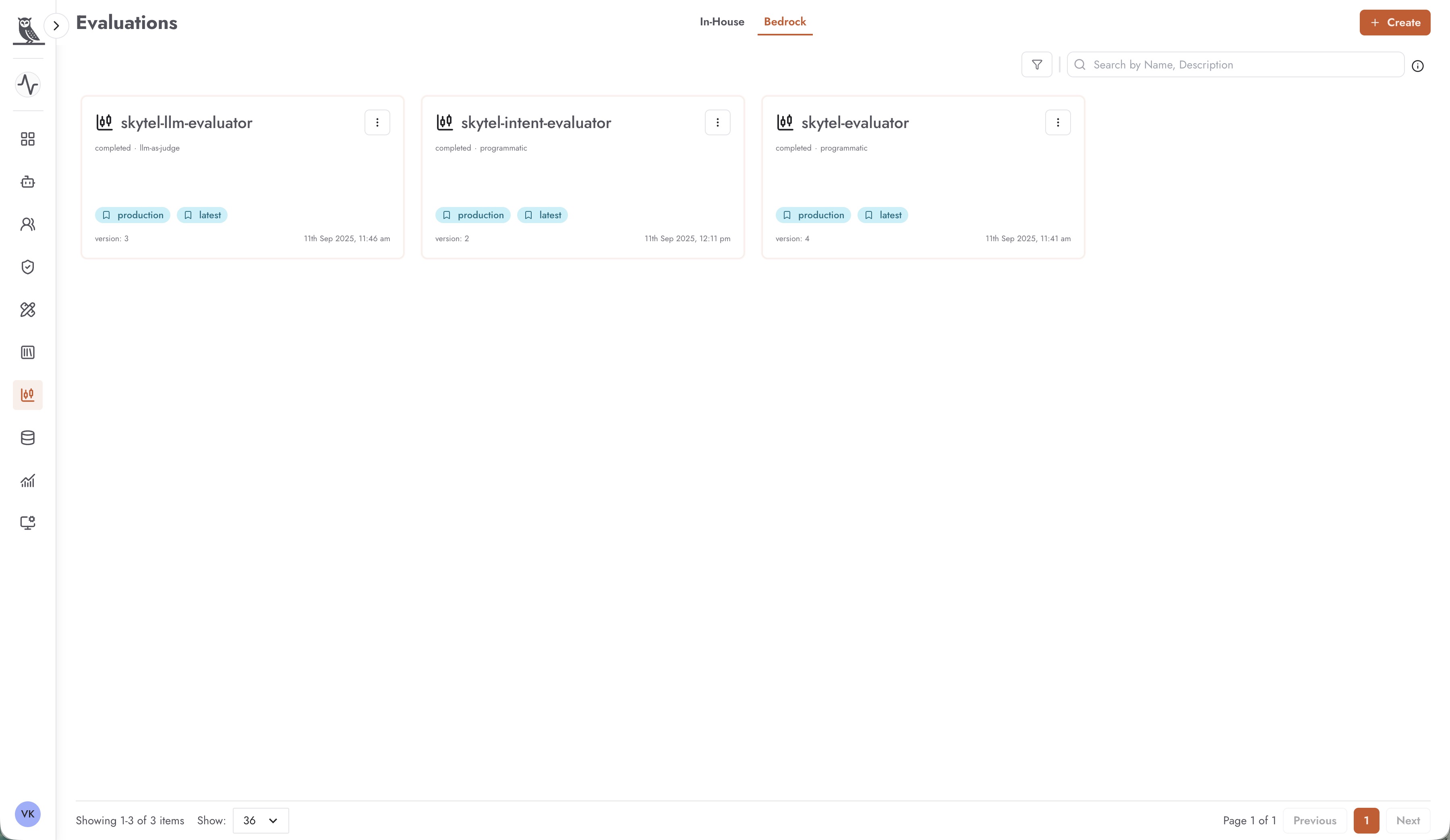
OneByZero Neo supports two types of evaluation frameworks, each offering different approaches to measuring agent quality:
In-House Evaluations - Evaluations powered by DeepEval, an open-source evaluation framework that provides a rich set of metrics for assessing LLM outputs
Bedrock Evaluations - Integration with AWS Bedrock Evaluations, offering both programmatic evaluation and model-as-a-judge capabilities
Both evaluation types are designed to work with the Datasets you have curated within Neo. The Datasets feature (available under the Datasets section) allows you to create, manage, and version test datasets that represent the scenarios and use cases your agents need to handle. By running evaluations against these datasets, you can objectively measure how well your agents perform and track improvements over time.
Why Evaluations Matter
Evaluating AI agents is essential for several reasons:
- Quality Assurance
Before deploying an agent to production, you need confidence that it will provide accurate, helpful, and appropriate responses. Evaluations provide objective metrics that quantify agent quality across multiple dimensions.
- Continuous Improvement
As you refine prompts, update knowledge bases, or modify agent configurations, evaluations help you measure whether these changes improve or degrade performance. This data-driven approach prevents regressions and guides optimization efforts.
- Compliance and Governance
Many organizations require documented evidence that AI systems meet quality and safety standards. Evaluation results provide auditable records of agent performance that can support compliance requirements.
- Benchmarking
Evaluations allow you to compare different agent configurations, model choices, or prompt strategies against the same dataset, helping you make informed decisions about which approach works best for your use case.
In-House Evaluations with DeepEval
In-House evaluations leverage DeepEval, a powerful open-source framework specifically designed for evaluating LLM applications. DeepEval provides a comprehensive suite of metrics that assess various aspects of agent response quality, from factual accuracy to potential biases.
Creating a DeepEval Evaluation
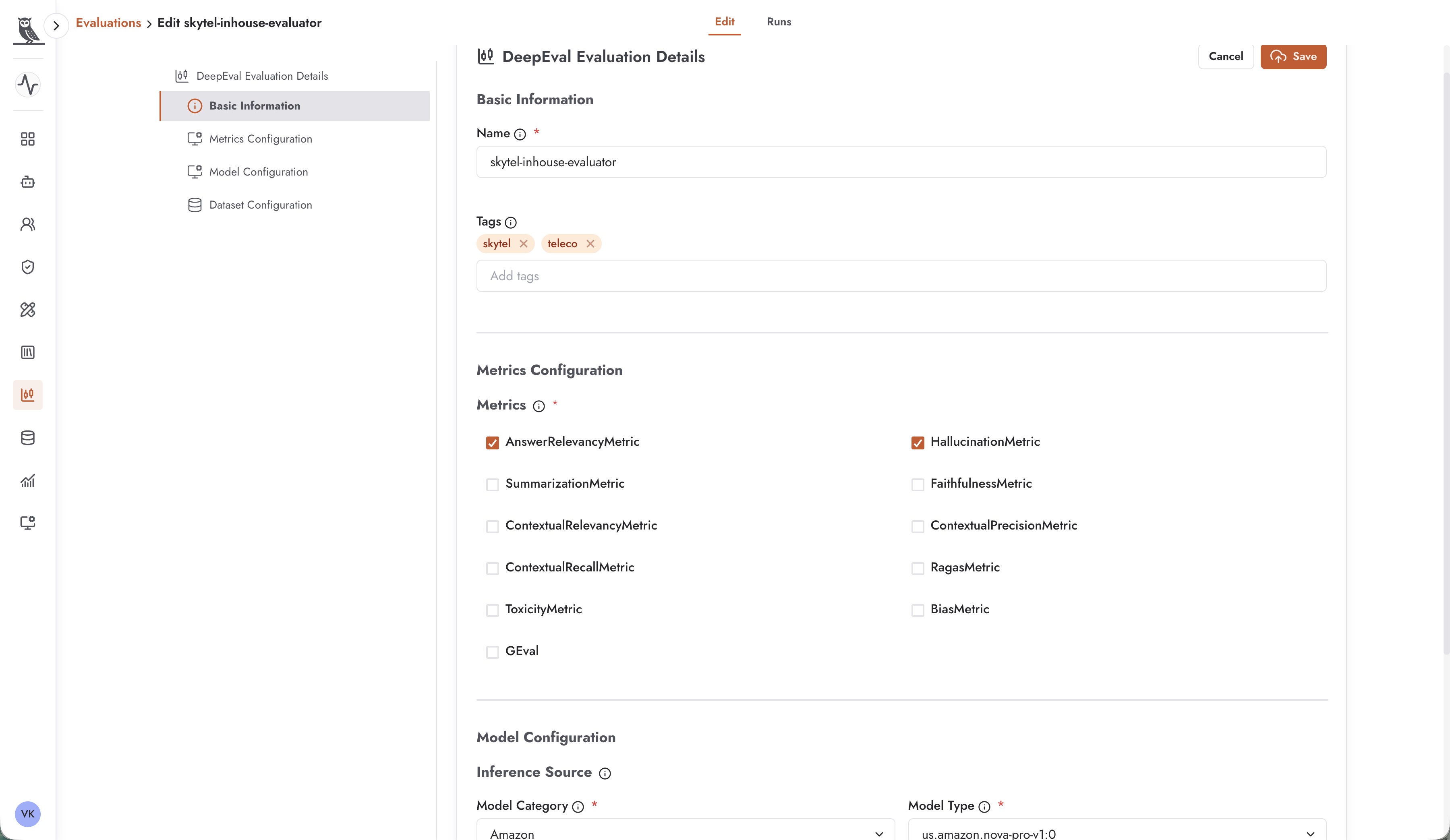
To create a new In-House evaluation, navigate to the Evaluations section, ensure you are on the In-House tab, and click the + Create button. The configuration process involves several key sections:
Basic Information
Name - Provide a descriptive name for your evaluation that indicates its purpose, such as “skytel-inhouse-evaluator” or “customer-support-quality-check”.
Tags - Apply tags to organize and categorize your evaluations. Tags help you filter and find evaluations, especially as your evaluation library grows. Common tags might include project names, agent types, or evaluation purposes.
Metrics Configuration
DeepEval offers a rich selection of metrics that you can enable based on what aspects of agent quality you want to measure:
AnswerRelevancyMetric - Measures how relevant the agent’s response is to the user’s question. High relevancy scores indicate that the agent is addressing what the user actually asked.
HallucinationMetric - Detects when the agent generates information that is not grounded in the provided context or knowledge base. Low hallucination scores are critical for applications where factual accuracy is essential.
SummarizationMetric - Evaluates the quality of summaries generated by the agent, assessing whether key information is captured accurately and concisely.
FaithfulnessMetric - Measures whether the agent’s response is faithful to the source material or context provided. This is particularly important for RAG (Retrieval-Augmented Generation) applications.
ContextualRelevancyMetric - Assesses whether the context retrieved for generating a response is relevant to the user’s query.
ContextualPrecisionMetric - Measures the precision of context retrieval, indicating what proportion of retrieved context is actually useful.
ContextualRecallMetric - Evaluates whether all relevant context needed to answer a question was successfully retrieved.
RagasMetric - A comprehensive metric suite specifically designed for evaluating RAG pipelines.
ToxicityMetric - Detects potentially harmful, offensive, or inappropriate content in agent responses.
BiasMetric - Identifies potential biases in agent responses across various dimensions such as gender, race, or other protected characteristics.
GEval - A flexible evaluation metric that uses LLMs to assess response quality based on custom criteria you define.
Model Configuration
The Model Configuration section allows you to specify which model should be used to perform the evaluation:
Inference Source - The source of the model used for evaluation
Model Category - The provider category (e.g., Amazon, Anthropic)
Model Type - The specific model to use for evaluation (e.g., us.amazon.nova-pro-v1:0)
Dataset Configuration
Select the dataset against which the evaluation should run. This dataset should contain representative examples of inputs your agent will encounter, along with expected outputs or reference answers where applicable.
Viewing DeepEval Results
After running a DeepEval evaluation, you can view detailed results that show how your agent performed across each selected metric.
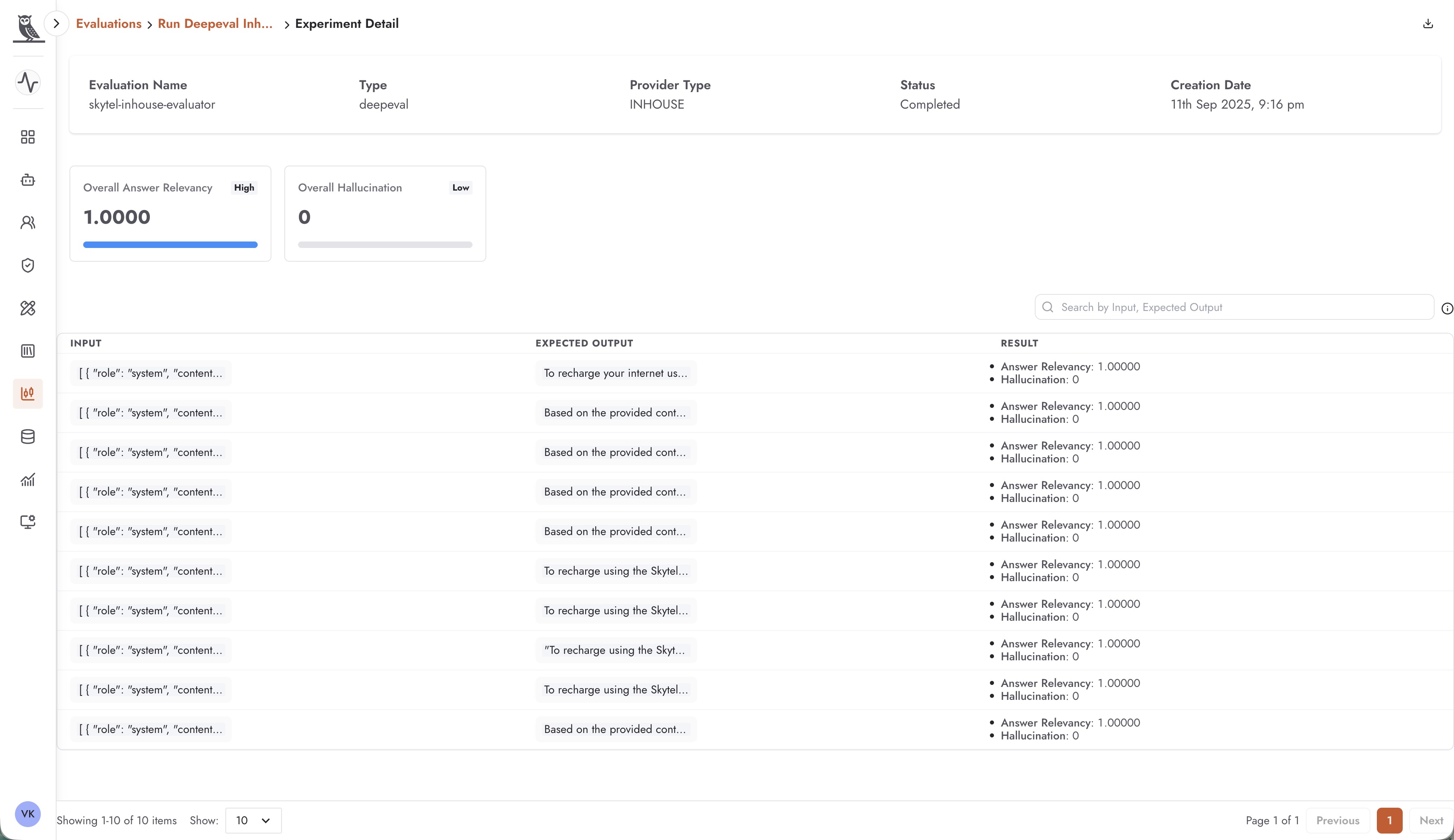
The results view provides:
Overall Metric Scores - Aggregate scores for each metric across all test cases, displayed with visual indicators showing whether scores are high (good) or low (needs attention)
Per-Record Results - A detailed table showing the input, expected output, and individual metric scores for each test case in your dataset
Evaluation Metadata - Information about the evaluation run, including the evaluation name, type (deepeval), provider type (INHOUSE), status, and creation date
For example, an evaluation might show an Overall Answer Relevancy score of 1.0000 (High) and an Overall Hallucination score of 0 (Low), indicating excellent performance on those dimensions.
Bedrock Evaluations
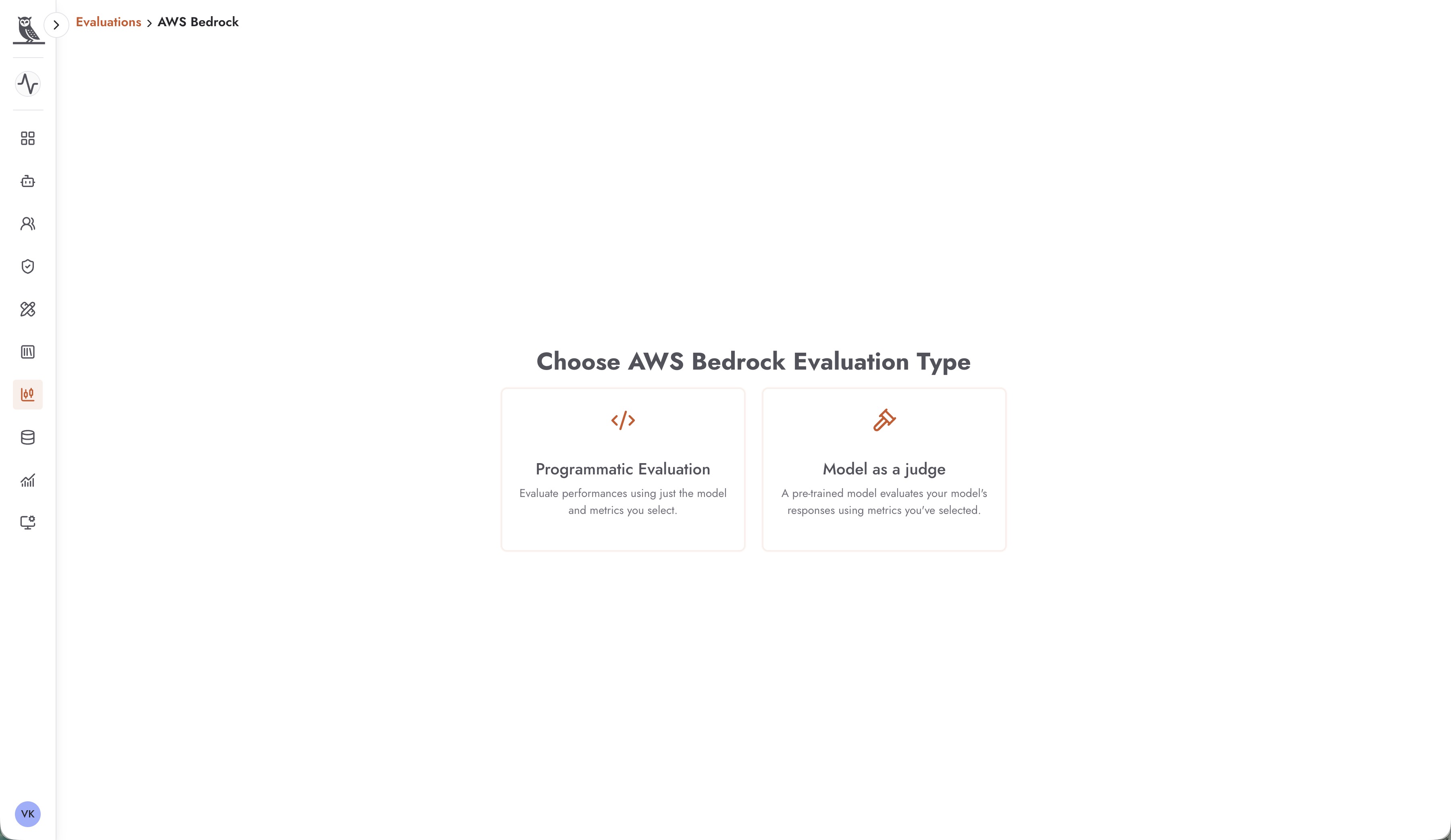
Bedrock Evaluations integrate OneByZero Neo with AWS Bedrock’s evaluation capabilities, providing enterprise-grade assessment tools backed by Amazon’s infrastructure. Bedrock offers two distinct evaluation approaches:
Programmatic Evaluation
Programmatic evaluations assess agent performance using deterministic metrics and algorithms. This approach evaluates performance using just the model outputs and the metrics you select, without requiring another LLM to judge the results. Programmatic evaluations are:
Fast and cost-effective to run
Consistent and reproducible
Best suited for metrics that can be computed algorithmically
Model as a Judge
Model-as-a-judge evaluations use a pre-trained LLM (the “judge”) to evaluate your agent’s responses against the metrics you’ve selected. This approach leverages the sophisticated understanding of a foundation model to assess nuanced aspects of response quality that are difficult to capture with programmatic metrics. Model-as-a-judge evaluations are:
More nuanced in their assessments
Better at evaluating subjective qualities like helpfulness and coherence
Capable of understanding context and intent
Configuring a Bedrock Model-as-Judge Evaluation
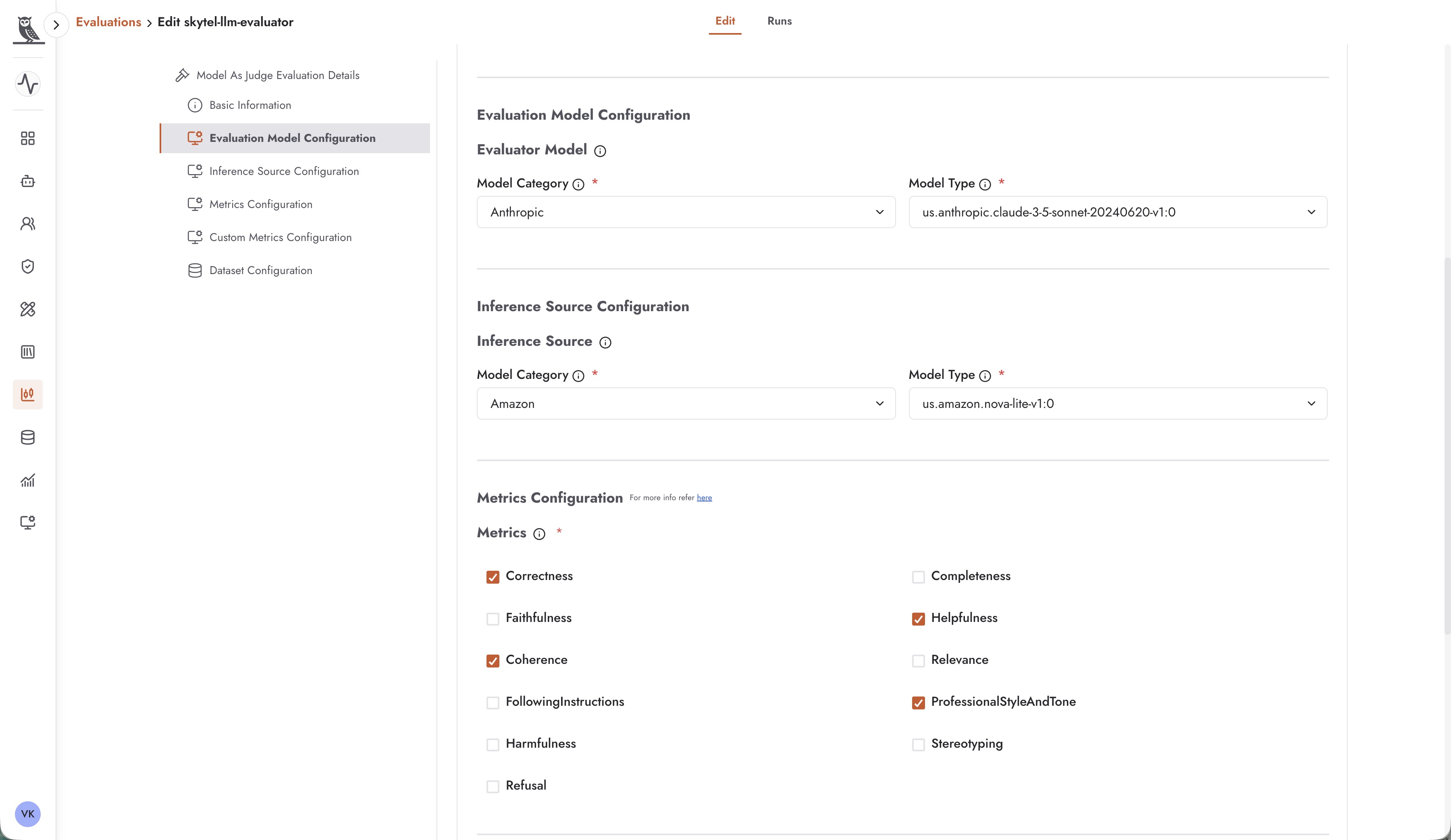
When creating a model-as-a-judge evaluation, you configure several key components:
Basic Information
Provide a name and optional tags for your evaluation, similar to DeepEval evaluations.
Evaluation Model Configuration
Select the model that will serve as the judge:
Evaluator Model Category - The provider of the judge model (e.g., Anthropic)
Evaluator Model Type - The specific model to use as the judge (e.g., us.anthropic.claude-3-5-sonnet-20240620-v1:0)
The judge model should be a capable foundation model that can accurately assess the quality of responses. Claude models from Anthropic are excellent choices for this role due to their strong reasoning capabilities.
Inference Source Configuration
Configure the model being evaluated:
Model Category - The provider of the model being evaluated (e.g., Amazon)
Model Type - The specific model being evaluated (e.g., us.amazon.nova-lite-v1:0)
Metrics Configuration
Bedrock provides a comprehensive set of metrics for model-as-a-judge evaluations:
Correctness - Evaluates whether the response is factually correct and accurate
Completeness - Assesses whether the response fully addresses all aspects of the user’s question
Faithfulness - Measures whether the response is faithful to the source material and doesn’t introduce unfounded claims
Helpfulness - Evaluates how helpful and useful the response is to the user
Coherence - Assesses the logical flow and clarity of the response
Relevance - Measures how relevant the response is to the user’s query
FollowingInstructions - Evaluates whether the agent followed any specific instructions provided
ProfessionalStyleAndTone - Assesses whether the response maintains an appropriate professional style and tone
Harmfulness - Detects potentially harmful content in responses
Stereotyping - Identifies responses that may contain stereotypes or biased generalizations
Refusal - Evaluates whether the agent appropriately refused to answer inappropriate requests
Custom Metrics Configuration
Beyond the built-in metrics, you can configure custom metrics tailored to your specific evaluation needs.
Dataset Configuration
Select the dataset from your Neo Datasets library against which the evaluation should run.
Viewing Bedrock Evaluation Results
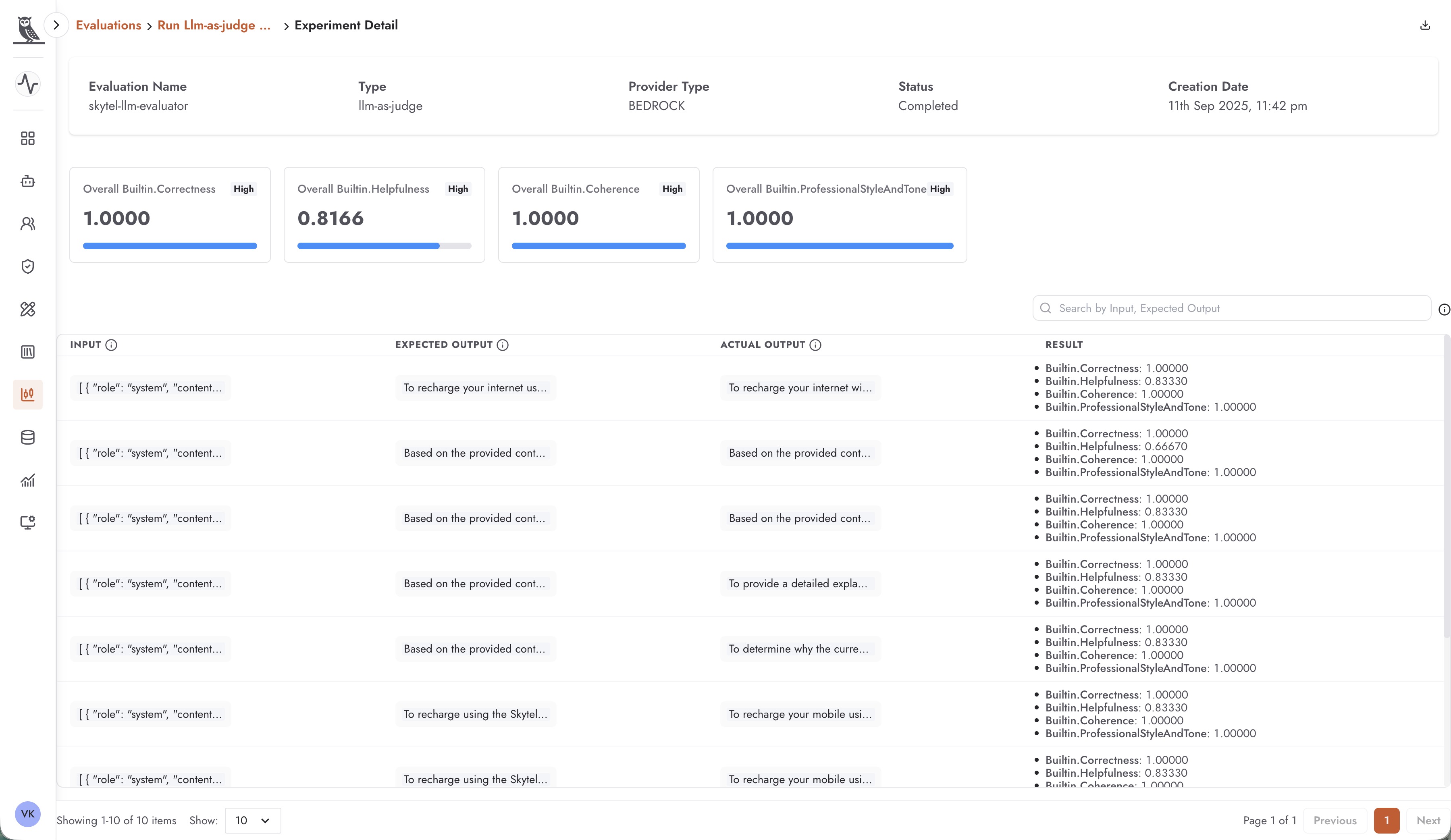
Bedrock evaluation results provide detailed insights into agent performance:
Overall Metric Scores - Aggregate scores for each enabled metric, showing values like Builtin.Correctness (1.0000), Builtin.Helpfulness (0.8166), Builtin.Coherence (1.0000), and Builtin.ProfessionalStyleAndTone (1.0000)
Per-Record Analysis - A detailed table showing Input, Expected Output, Actual Output, and individual Result scores for each test case
Evaluation Metadata - Information including evaluation name, type (llm-as-judge), provider type (BEDROCK), status, and creation date
The results allow you to identify specific test cases where the agent underperformed, helping you understand patterns and target improvements effectively.
Managing Evaluations
The Evaluations page provides tools for managing your evaluation library:
Search and Filter
Use the search box to find evaluations by name or description. As your evaluation library grows, this becomes essential for quickly locating specific evaluations.
Version Management
Each evaluation displays its version number and last modified timestamp. This allows you to track the evolution of your evaluation configurations over time.
Tags and Organization
Apply tags like “production”, “latest”, or project-specific identifiers to organize your evaluations. Tags help team members quickly identify which evaluations are actively used and for what purpose.
Runs History
Each evaluation maintains a history of runs, allowing you to compare results over time and track how agent performance evolves as you make changes.
Best Practices for Evaluations
Curate Representative Datasets
The quality of your evaluations depends on the quality of your test datasets. Ensure your datasets cover:
Common use cases and questions
Edge cases and challenging scenarios
Different user intents and phrasings
Scenarios that have caused issues in the past
Select Appropriate Metrics
Choose metrics that align with what matters most for your use case:
For RAG applications, prioritize faithfulness, hallucination, and contextual metrics
For customer-facing agents, emphasize helpfulness, professional tone, and harmfulness detection
For technical support, focus on correctness and completeness
Establish Baselines
Run evaluations before making changes to establish baseline performance. This allows you to objectively measure the impact of modifications.
Automate Regular Evaluations
Set up regular evaluation runs to catch regressions early and maintain consistent quality monitoring.
Review Individual Failures
Don’t just look at aggregate scores—examine individual test cases that scored poorly to understand why and identify targeted improvements.