Agreement
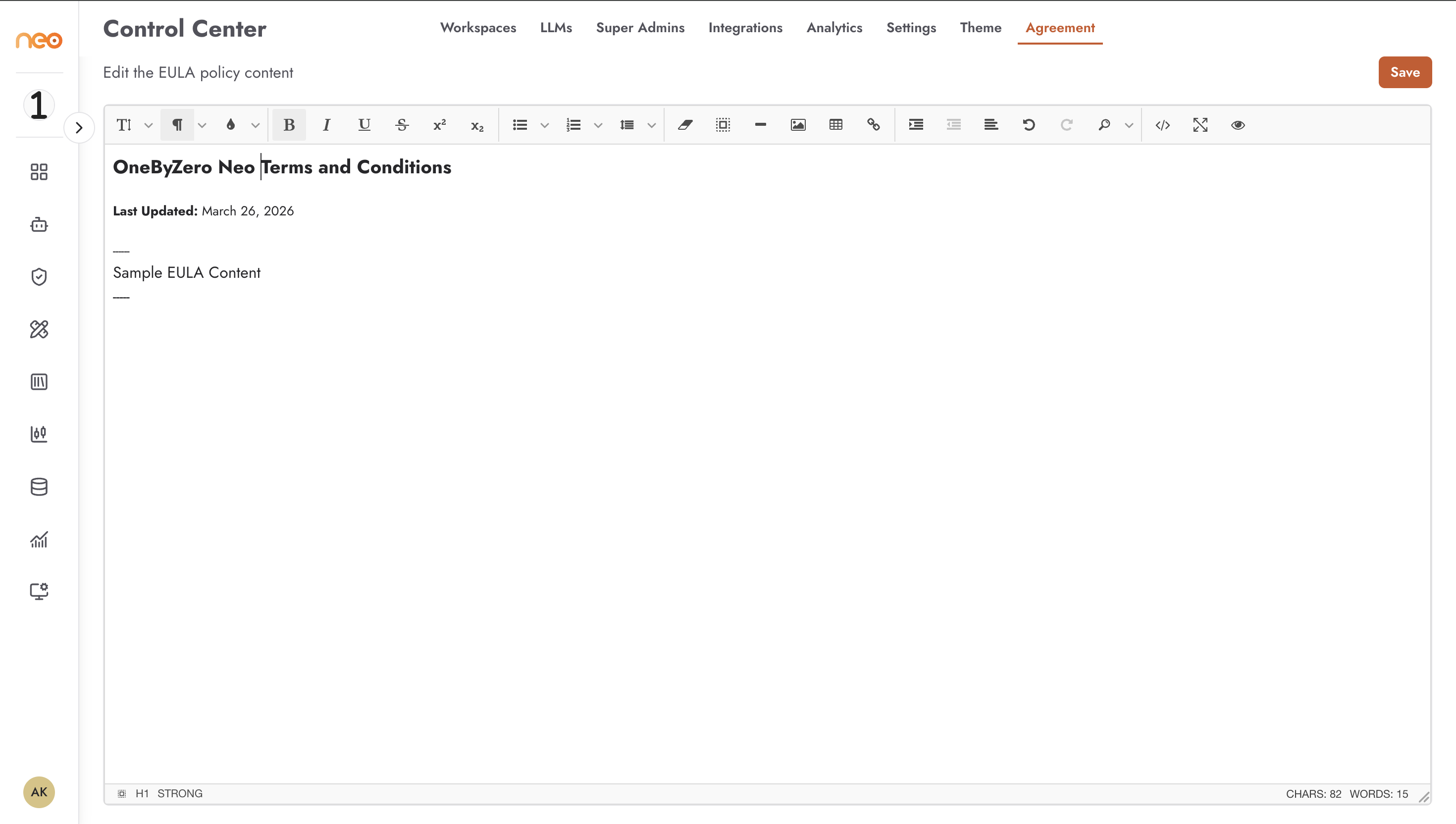
The Agreement tab is where Super Administrators manage the platform’s End User Licence Agreement (EULA). When the Agreement feature is enabled for your deployment, all users are required to accept the EULA before they can access the platform. Super Administrators can view and edit the EULA content from this tab.
Note
The Agreement tab is only visible when the EULA feature flag is enabled for your Neo deployment. Contact your platform administrator or OneByZero if this feature needs to be activated.
Managing the EULA
The Agreement tab provides a rich text editor where you can author and update the EULA content. The editor supports full text formatting — headings, bullet lists, bold/italic text, and other standard formatting elements.
To update the EULA:
Edit the policy content in the rich text editor
Click Save to publish the updated content
The updated policy takes effect immediately. Users who have not yet accepted the new version will be prompted to review and accept it the next time they access the platform.
Best Practices
- Legal review before publishing
Any change to the EULA content should be reviewed by your legal or compliance team before being saved. Changes take effect immediately for all users.
- Version communication
When making significant changes to the agreement, notify users in advance through your organisation’s standard communication channels so they are not surprised by a new consent prompt.