In-House Evaluations (DeepEval)
In-House evaluations use DeepEval, an open-source framework designed specifically for evaluating LLM outputs. DeepEval provides a comprehensive suite of metrics that assess different dimensions of agent response quality.
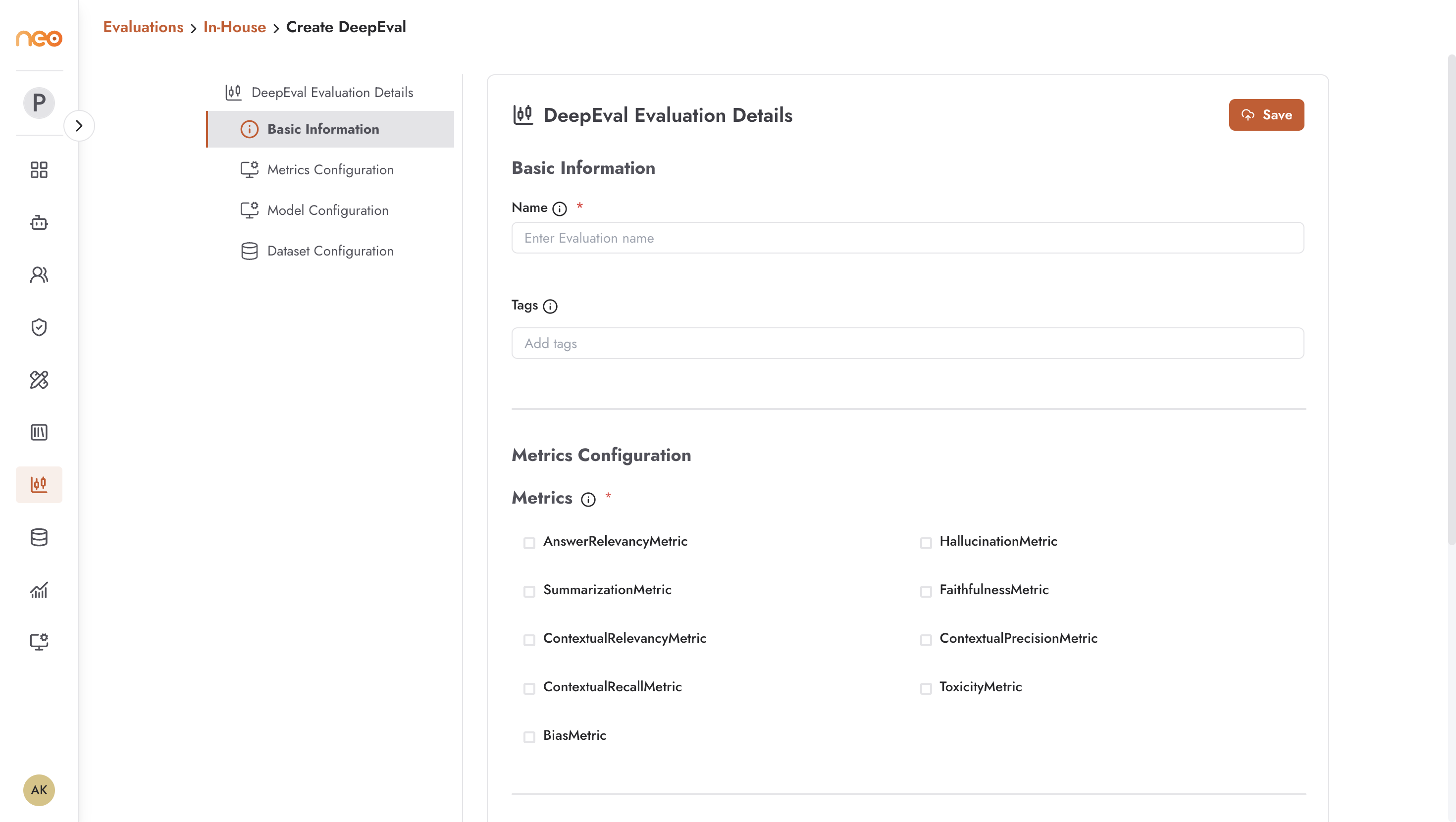
Creating a DeepEval Evaluation
Navigate to the Evaluations page, select the In-House tab, and click + Create.
Basic Information
Name — a descriptive name:
customer-support-quality-v2,skytel-inhouse-evaluator.Tags — apply tags for filtering and organisation.
Metrics Configuration
Select the metrics to compute for this evaluation. Enable only the metrics relevant to your use case — unnecessary metrics add evaluation time and cost. Available metrics:
AnswerRelevancyMetric — measures how relevant the agent’s response is to the user’s question. Low scores indicate the agent is answering a different question or going off-topic.
HallucinationMetric — detects when the agent generates content not grounded in the provided context. Critical for RAG applications where factual accuracy is required. Lower is better.
SummarizationMetric — evaluates the quality of summaries. Useful for agents that are expected to condense documents or conversation history.
FaithfulnessMetric — measures whether the response is faithful to the retrieved source material. Closely related to hallucination detection for RAG agents.
ContextualRelevancyMetric — assesses whether the retrieved context is relevant to the user’s query. Useful for diagnosing retrieval quality separately from generation quality.
ContextualPrecisionMetric — measures what proportion of retrieved context is actually useful for generating the response.
ContextualRecallMetric — evaluates whether all relevant context needed to answer the question was successfully retrieved.
ToxicityMetric — detects harmful, offensive, or inappropriate content in responses. Important for customer-facing agents.
BiasMetric — identifies potential biases in responses related to gender, race, or other protected characteristics.
Model Configuration
Specify the model used to perform the evaluation (the judge model):
Inference Source — the source of the evaluator model.
Model Category — the provider (e.g. Amazon, Anthropic).
Model Type — the specific model (e.g.
us.amazon.nova-pro-v1:0).
Dataset Configuration
Select the dataset from your Foundry Datasets library. All items in the dataset will be run through the evaluation.
Running and Viewing Results
After configuring, click Run to start the evaluation. The evaluation processes each dataset item and computes the selected metrics.
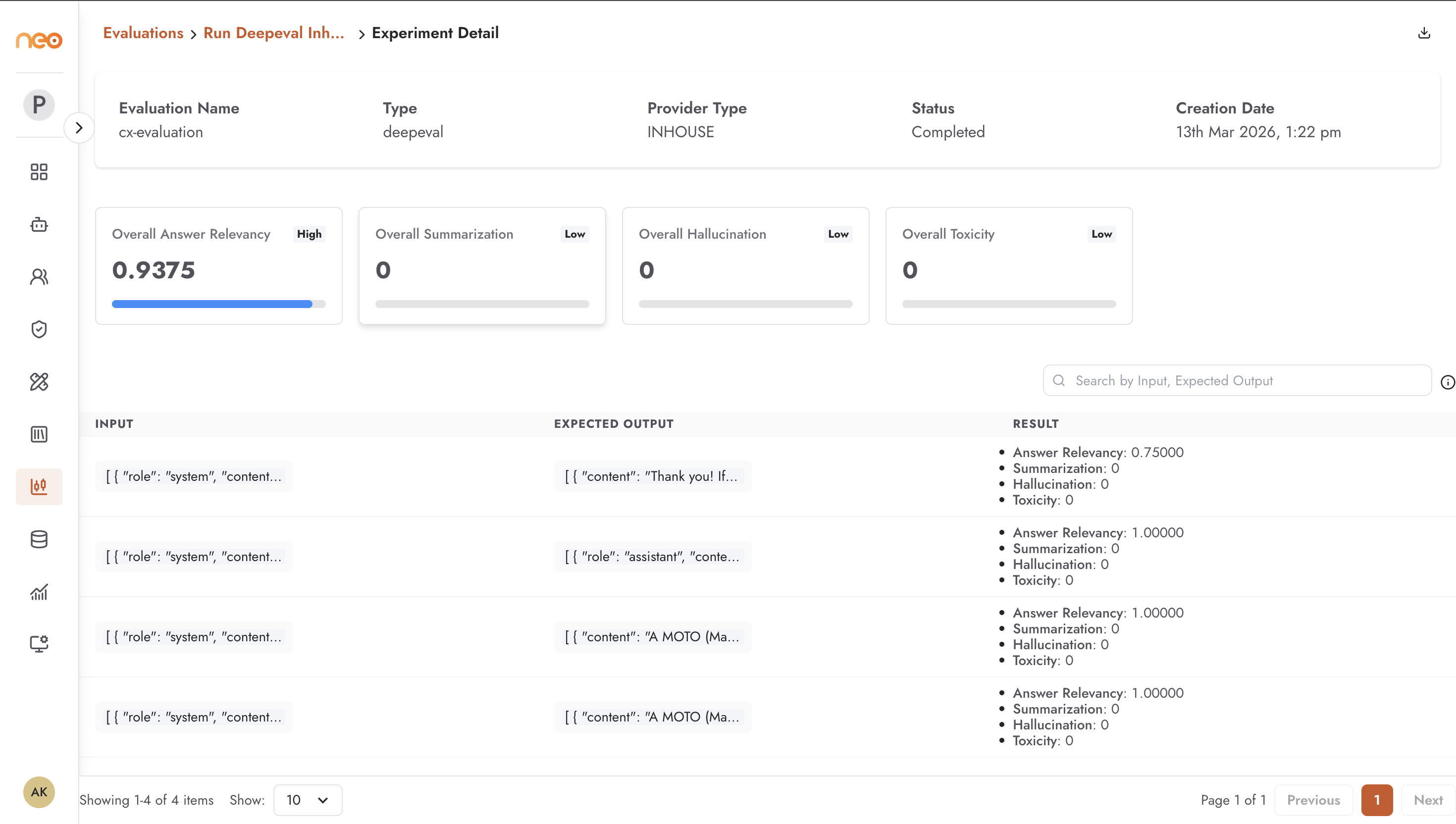
The results view shows:
Evaluation metadata — name, type (
deepeval), provider type (INHOUSE), status, and creation date.Overall metric scores — aggregate score for each enabled metric across all test cases. Scores are displayed with visual indicators (High / Low).
Per-record results — a table showing the input, expected output, actual output, and individual metric scores for each dataset item. Use this to identify specific test cases where the agent underperformed.
Example results: an AnswerRelevancy score of 1.0000 (High) and a Hallucination score of 0 (Low) indicate strong performance on those dimensions.
Best Practices
Start with a minimal set of metrics relevant to your agent type: for RAG agents, enable FaithfulnessMetric, HallucinationMetric, and ContextualRelevancyMetric. For customer-facing agents, add AnswerRelevancyMetric and ToxicityMetric.
Run an evaluation before and after each significant agent change (prompt update, model swap, knowledge base refresh) to measure impact. A baseline score makes regressions immediately visible.
Review per-record results, not just overall scores. A high average can mask a small number of severely failing test cases that represent real production risks.