Bedrock Evaluations
Bedrock evaluations integrate with AWS Bedrock Evaluations, providing enterprise-grade assessment backed by Amazon’s infrastructure. Bedrock offers three distinct evaluation approaches that suit different measurement needs.
Evaluation Types
Programmatic Evaluation
Programmatic evaluations compute metrics algorithmically from the model’s outputs, without requiring another LLM to judge the results. They are:
Fast and cost-effective to run.
Consistent and fully reproducible — the same inputs always produce the same scores.
Best suited for metrics that can be computed deterministically from text.
Programmatic evaluations also require a Task Type to be specified, which tells Bedrock the nature of the task being evaluated:
Summarization— the agent is summarising documents or conversations.Classification— the agent is categorising inputs.QuestionAndAnswer— the agent is answering questions.Generation— the agent is generating free-form content.
Available programmatic metrics:
Builtin.Robustness — measures how consistently the model performs when inputs are perturbed or rephrased.
Builtin.Toxicity — detects harmful or offensive content in model outputs.
Builtin.Accuracy — measures factual accuracy against a structured ground truth.
LLM as a Judge
LLM-as-a-judge evaluations use a foundation model (the “judge”) to assess response quality. The judge model reads the input, expected output, and actual output and scores the response against the selected metrics. This approach:
Handles nuanced, subjective quality dimensions that algorithms cannot assess.
Understands context and intent rather than just surface text similarity.
Is better suited for metrics like helpfulness, coherence, and professional tone.
DeepEval (via Bedrock)
A DeepEval evaluation type is also available under the Bedrock tab. This runs the same DeepEval metric suite as In-House evaluations but uses Bedrock infrastructure for execution. See In-House Evaluations (DeepEval) for metric details.
Creating a Bedrock Evaluation
Navigate to the Evaluations page, select the Bedrock tab, and click + Create.
Basic Information
Name — a descriptive name for the evaluation.
Tags — apply tags for filtering and organisation.
Evaluation Model Configuration (LLM as a Judge only)
Select the model that will serve as the judge:
Evaluator Model Category — the provider (e.g. Anthropic).
Evaluator Model Type — the specific model (e.g.
us.anthropic.claude-3-5-sonnet-20240620-v1:0). Use a highly capable model — the judge’s reasoning quality directly determines the evaluation quality.
Inference Source Configuration
Configure the model being evaluated:
Model Category — the provider of the agent’s LLM (e.g. Amazon).
Model Type — the specific model being evaluated (e.g.
us.amazon.nova-lite-v1:0).
Metrics Configuration
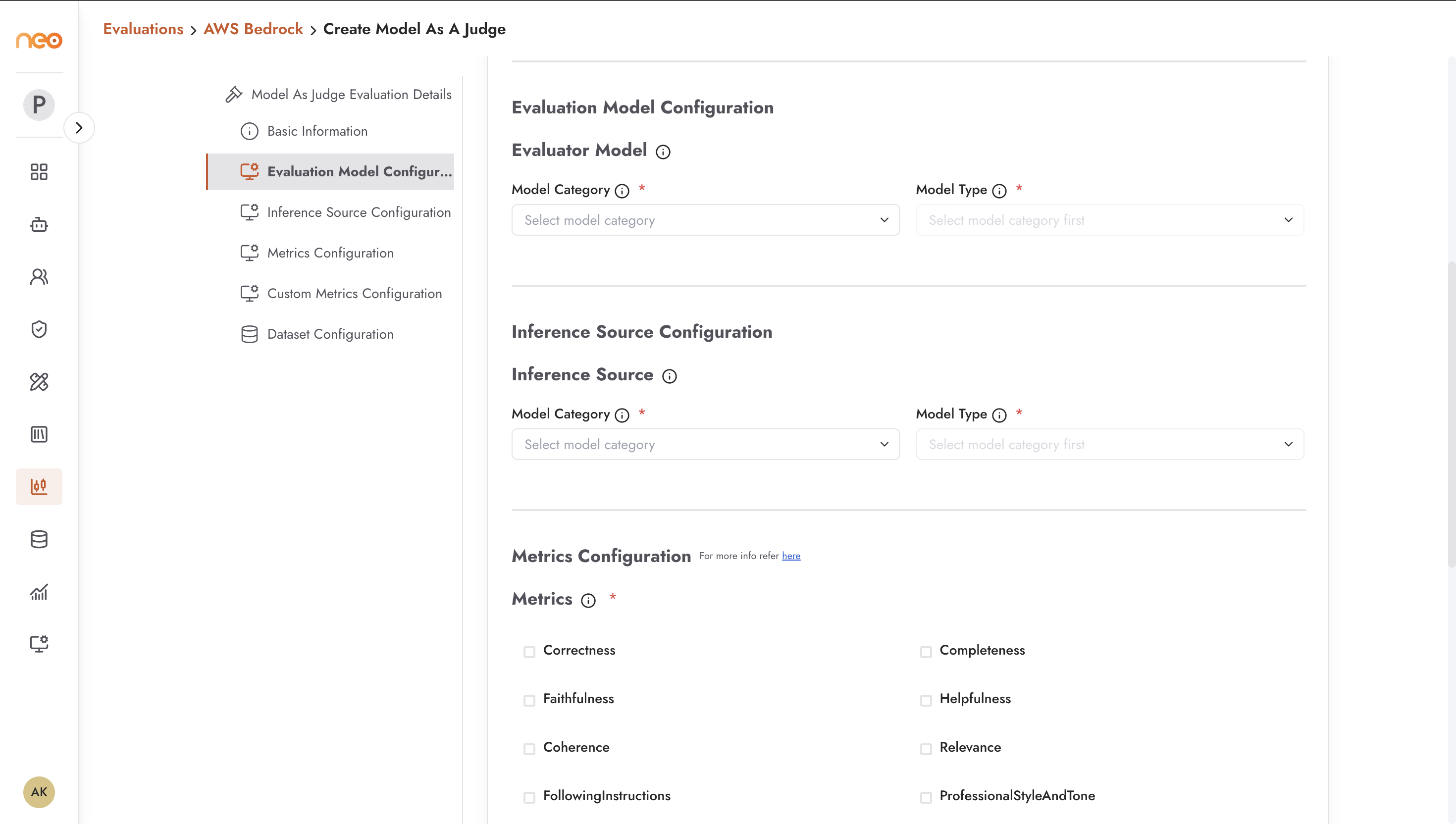
For LLM-as-a-judge evaluations, the available built-in metrics are (all prefixed Builtin.):
Builtin.Correctness — is the response factually correct and accurate?
Builtin.Completeness — does the response fully address all aspects of the user’s question?
Builtin.Faithfulness — is the response faithful to the source material, without introducing unsupported claims?
Builtin.Helpfulness — how useful and actionable is the response to the user?
Builtin.Coherence — is the response logically structured and clearly written?
Builtin.Relevance — how relevant is the response to the query?
Builtin.FollowingInstructions — did the agent follow any specific instructions provided in the system prompt or conversation?
Builtin.ProfessionalStyleAndTone — does the response maintain an appropriate professional style and tone?
Builtin.Harmfulness — does the response contain potentially harmful content?
Builtin.Stereotyping — does the response contain stereotypes or biased generalisations?
Builtin.Refusal — did the agent appropriately refuse to answer requests it should decline?
In addition to the built-in metrics, you can configure custom metrics with your own criteria and descriptions.
Dataset Configuration
Select the dataset from your Foundry Datasets library against which the evaluation should run.
Viewing Bedrock Results
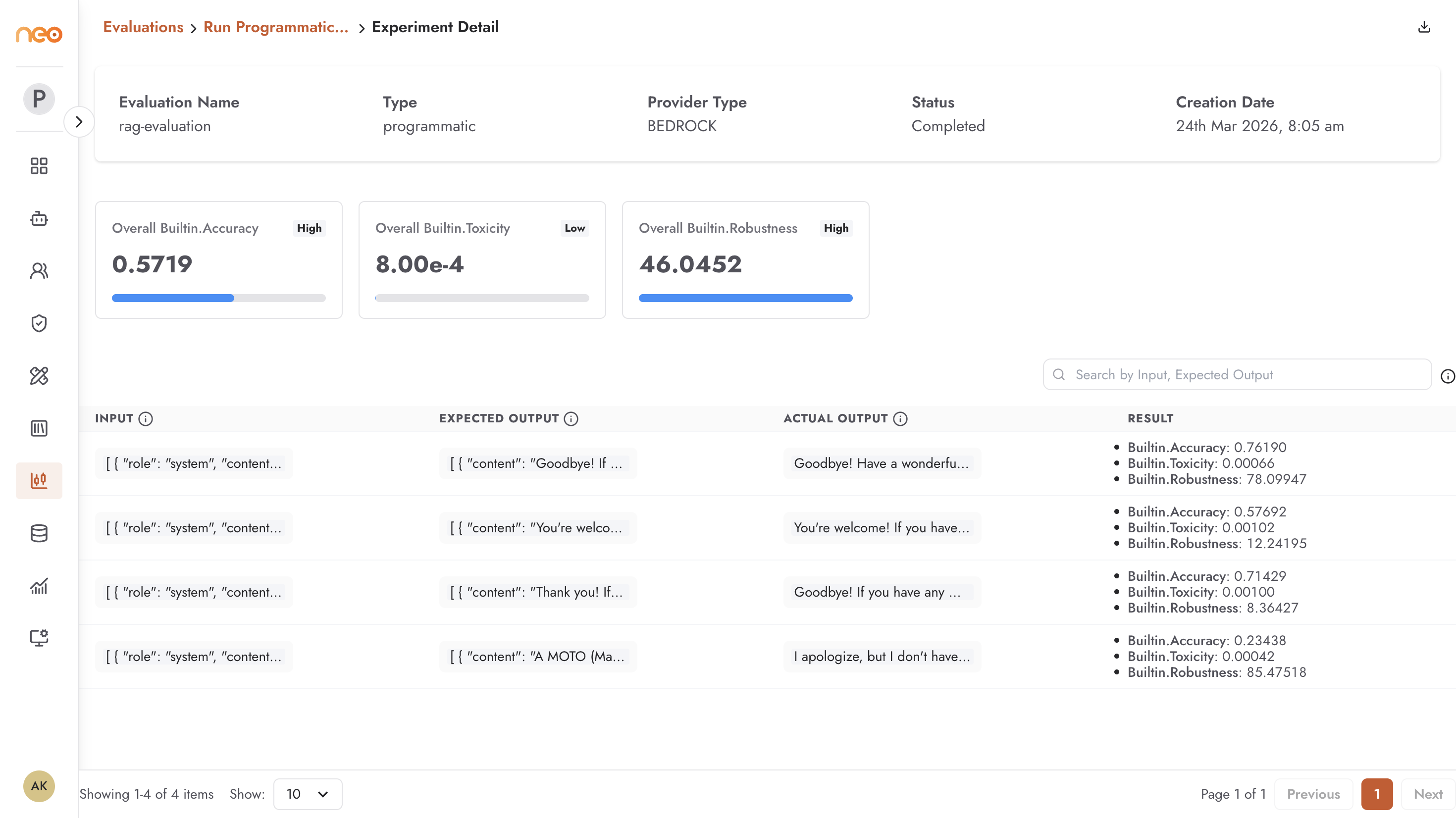
The results view shows:
Evaluation metadata — name, type (
llm-as-judge,programmatic, ordeepeval), provider type (BEDROCK), status, and creation date.Overall metric scores — aggregate scores for each enabled metric, e.g.
Builtin.Correctness (1.0000),Builtin.Helpfulness (0.8166),Builtin.Coherence (1.0000).Per-record analysis — a table showing Input, Expected Output, Actual Output, and individual Result scores for each test case. Use this to identify specific failures and understand patterns.
Best Practices
Use Programmatic evaluation for speed and cost efficiency when measuring objective metrics — exact match, factual accuracy with a structured ground truth.
Use Model as a Judge for subjective quality dimensions — tone, helpfulness, coherence — that require contextual understanding.
Choose a capable judge model (Claude Sonnet-class or better). A weak judge produces unreliable scores, especially for nuanced metrics like helpfulness and professional tone.
Run evaluations consistently across agent versions by always using the same dataset and the same metric configuration. Changing the dataset or metrics between runs makes scores incomparable.
Use Bedrock evaluations when your organisation requires auditable, cloud-managed evaluation infrastructure — the evaluation runs and results are stored in your AWS account.