Retrieval Testing
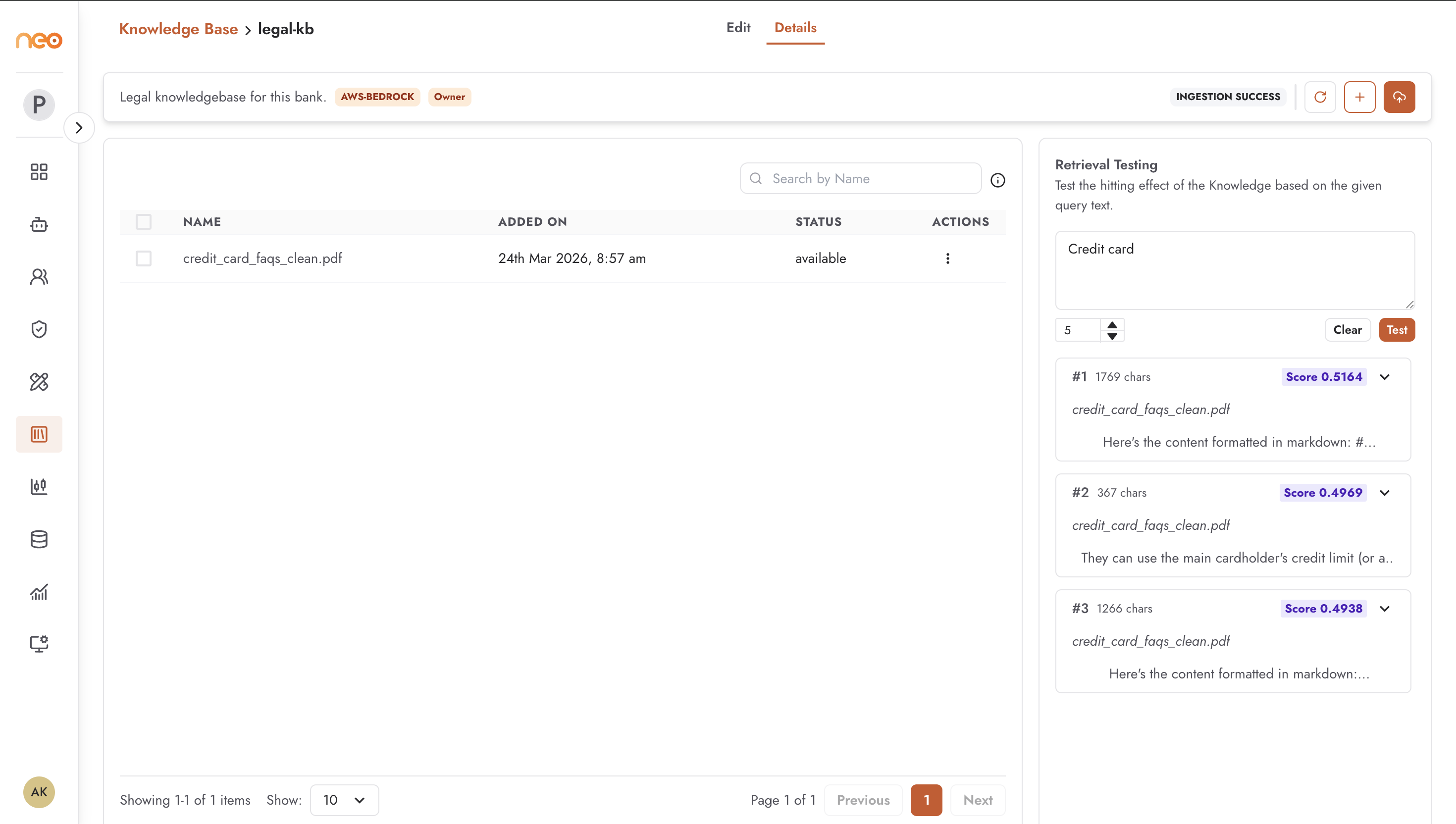
After ingesting documents, the knowledge base detail view includes a Retrieval Testing panel that lets you query the vector index directly — without involving an agent or an LLM. This lets you verify that your chunking, embedding, and document content are producing the expected retrieval results before you connect the knowledge base to an agent.
The Retrieval Testing Panel
The panel appears on the right side of the knowledge base detail view. It contains:
Query input — a text area where you enter a test query.
Top K — a number input (range 1–10) specifying how many chunks to return. Default is 5.
Test button — submits the query and retrieves the top K most similar chunks.
Clear button — clears the query and results.
Running a Retrieval Test
Open the knowledge base detail view.
Ensure ingestion has completed successfully.
Enter a representative query in the query input — use natural language similar to how users would phrase questions to an agent using this knowledge base.
Set Top K to the number of results you want to review (start with 5).
Click Test.
The results appear below as an accordion list. Each result shows:
Rank — result number (
#1,#2, etc.).Character count — length of the chunk in characters.
Document name — the source document this chunk came from.
Similarity score — cosine similarity score (shown as
Score 0.XXXX). Higher is more relevant.Chunk text — the full text of the chunk, expandable by clicking the accordion row. Search terms in your query are highlighted in the expanded text.
Interpreting Results
Good retrieval — the top results are from the documents you expect, with high similarity scores and text that directly addresses the query. Chunks contain enough context to answer the question.
Poor retrieval signals:
Top results are from irrelevant documents — the query wording may not match the document vocabulary. Consider adjusting document content, adding synonyms, or changing the embedding model.
Results are too narrow (missing context) — Max Tokens per Chunk may be too small. Increase it and re-ingest.
Results contain too much noise — Max Tokens per Chunk may be too large, causing unrelated content to be bundled into the same chunk. Reduce it and re-ingest.
Low similarity scores across all results — the query may not match the content at all, or ingestion may have failed silently. Check ingestion status and verify document content.
Per-Document Chunk Preview
In addition to knowledge-base-level retrieval testing, you can inspect the chunks for a specific document. From the documents table, open the action menu on any row and select View Chunks.
The Chunks page shows a table of all chunks extracted from that document. Each row is clickable to open a detail drawer showing the full chunk text. From this page you can also run a retrieval query scoped to that document, with a configurable Top K value and a search query input.
This is useful for verifying that a specific document was parsed and chunked correctly, especially for complex layouts.