In-House Guardrails
In-House guardrails use Neo’s native evaluation engine. A prompt you define is sent to an LLM along with the content being evaluated, and the model’s response is matched against the pass/fail criteria you configure. This approach gives you complete control over the evaluation logic and works for any content type or policy that can be described in natural language.
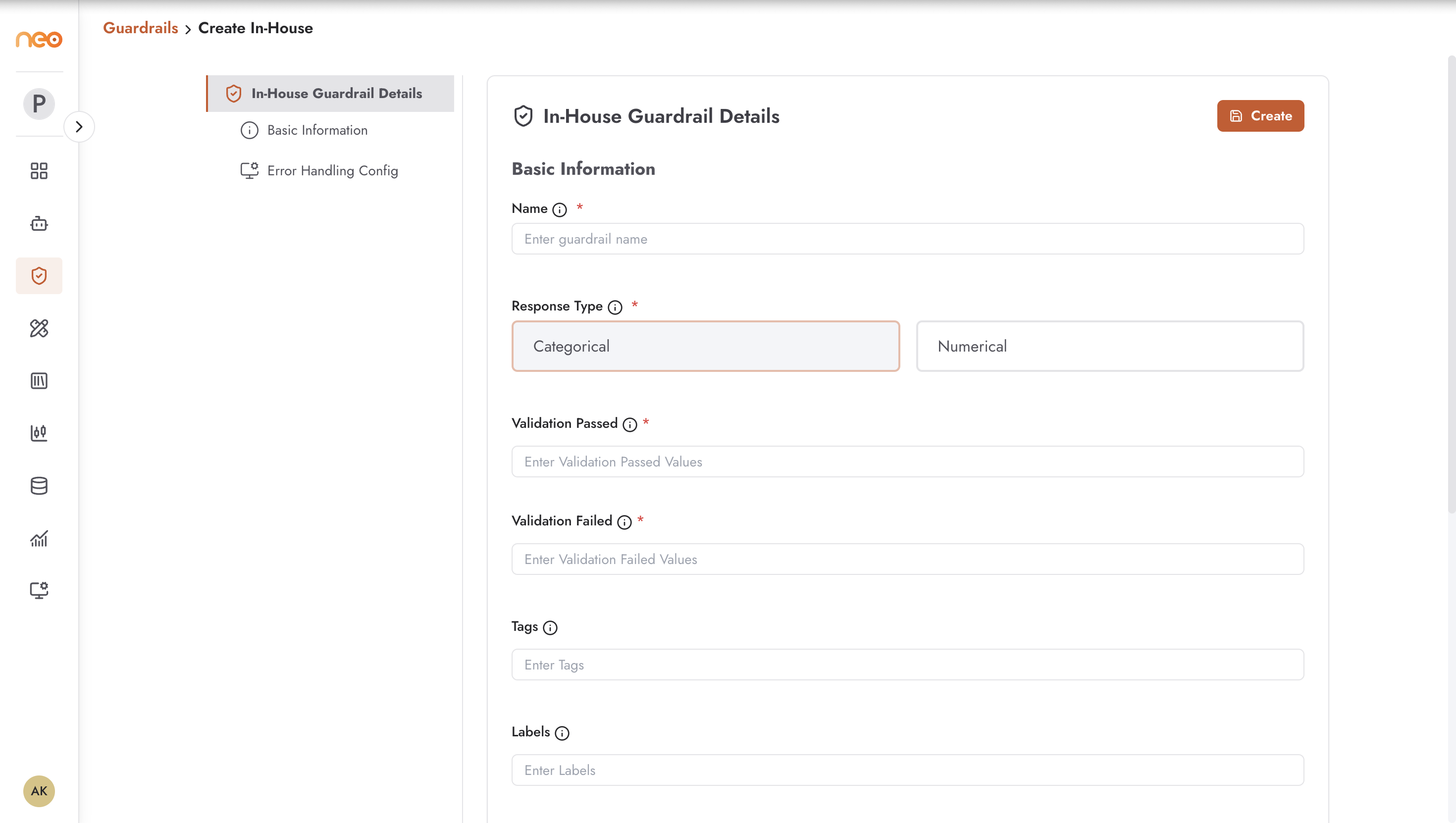
Creating an In-House Guardrail
Click + Create on the In-House tab to open the creation form.
Basic Information
Name — a unique, descriptive name. Use names that communicate the policy at a glance:
competitor-mention-block,banking-safe-messaging,healthcare-pii-flag.Tags — apply tags for organisation and filtering.
Labels — additional metadata labels for reporting and governance.
Response Type
Controls how the guardrail’s evaluation model returns its verdict:
Categorical — the model returns a discrete label from a set you define, such as
safe/unsafeorcontains_competitor/clean. Use this when you need to classify content into distinct categories for routing or blocking decisions.Numerical — the model returns a numeric score. Use this when you need threshold-based decisions or when the confidence of a classification matters (e.g. a toxicity score of 0.0 to 1.0).
Validation Passed / Validation Failed
These fields define what constitutes a pass or fail verdict:
For categorical guardrails, enter the label values that represent a pass and the values that represent a fail (e.g.
validation_passed = ["safe", "clean"],validation_failed = ["unsafe", "blocked"]).For numerical guardrails, configure:
Min and Max — the numeric bounds for the acceptable range.
Threshold — the specific value used for comparison.
Comparison — the comparison operator:
Greater Than,Less Than,Equal To, orBetween.
Prompt
The core of the guardrail. This prompt is sent to the LLM evaluator alongside the content being checked. Write it as a clear instruction:
“Evaluate whether the following text mentions any competitor product or company by name. Respond with ‘contains_competitor’ if competitor information is present, or ‘clean’ if no competitor information is found.”
Specific, unambiguous prompts produce reliable guardrail results. Vague prompts can lead to inconsistent evaluations.
Error Handling Configuration
Defines what happens when the guardrail evaluation itself fails (network timeout, model unavailable, etc.):
Strategy — the only supported strategy is Fallback. Configure the fallback behaviour to either allow or block by default when the evaluation cannot complete.
Max Retries — the number of times the platform will retry the evaluation before applying the fallback behaviour. Set a low value (1–2) for latency-sensitive agents.
This is a safety-critical setting: for guardrails that enforce regulatory compliance or block harmful content, set the fallback to block. For less critical checks where availability matters more than strict enforcement, set it to allow.
Applying Guardrails to Agents
Once created, guardrails are applied from within the agent’s Settings tab. You can apply multiple guardrails to a single agent — one for PII, one for brand compliance, one for topic restrictions, for example. Guardrails can be applied to inputs (user messages), outputs (agent responses), or both, depending on the agent type’s configuration.
Best Practices
Test your guardrail prompt with representative pass and fail examples before attaching it to a production agent. Send content that should be blocked and verify it fails; send clean content and verify it passes.
For critical policies (regulatory, safety), set the error handling strategy to block by default. An unavailable guardrail that defaults to allow creates a window of unprotected traffic.
Use specific, unambiguous prompts. Avoid hedging language like “might contain” or “could be” — instead use “contains” and define edge cases explicitly in the prompt.
Apply separate guardrails for separate concerns. A single catch-all guardrail prompt is harder to maintain and debug than three focused guardrails for PII, competitor mentions, and tone respectively.